

GenAI-created xDBML
Hackolade Studio reverse-engineers xDBML into a Polyglot data model. You can ask a generative AI assistant, such as ChatGPT, Claude, Copilot, or Gemini, to write an xDBML schema from your business requirements, then import its response from a file or from the clipboard. The result is a Polyglot data model that you can then edit and enrich in Hackolade Studio, and from which you can derive physical models for your target technologies.
xDBML
xDBML is an open-source text markup language that describes the structure of data: entities, fields, data types, keys, relationships and views. The same syntax is used for relational databases, for document, columnar and graph databases, and for data exchange formats. Its specification is published under the Apache 2.0 license, with Hackolade as its steward. The current version of the specification is the draft version 0.7.
xDBML is a strict superset of DBML 10.3.1, so every valid DBML document is also a valid xDBML document. The topic GenAI-created DBML explains why a markup language of this kind is easier for an LLM to write than SQL DDL or Mermaid ER code which we both support as well. DBML describes flat tables, and has no syntax for nested fields or arrays of objects. xDBML adds, among others:
- nested objects and arrays, as found in MongoDB documents, JSON, Avro records or BigQuery STRUCTs
- polymorphic fields, with
oneOfandunion - reusable named types
- containers, with the specific keyword of each technology supported by Hackolade:
Schema,Database,Keyspace,Namespace,DatasetorBucket - relationships with a minimum and a maximum cardinality at each end, and with roles and verbs
- views with their source query
- graph edges that carry their own properties
- settings that help AI tools and data catalogs find the right element, such as synonyms, business terms, classification tags and granularity
- custom properties, whose names start with
x_
The xDBML playground draws the diagram of a schema while you type or paste it, and lists each error and warning with its line number.
Syntax
An xDBML document is plain text. Its first line declares the version of the specification, xdbml: 0.7. Without this line, a parser reads the document as DBML and rejects the xDBML constructs. A file containing an xDBML document has the extension .xdbml.
| Element | How it is written | Example |
|---|---|---|
| Comment | // to the end of the line, or between /* and */ | // Customer data |
| Entity | Entity, or the word of the technology: Table, Collection or Record | Table orders { ... } |
| Field | One field per line: the name, the data type, then the settings in brackets | email varchar(255) [unique, not null] |
| Settings | In brackets, separated by commas, also when each setting is on its own line | [pk, not null, note: 'Customer number'] |
| Text | Between single quotes, or between three single quotes for text on several lines and text that holds a quote | note: 'Billing address' |
| Expression computed by the database | Between backticks | default: `now()` |
| Name or data type with spaces | Between double quotes | "order details" |
| Nested object | object, then the fields between braces | address object { city varchar } |
| Array | array, then the type of its items between brackets | labels array [varchar] |
| Key on several fields, or key with a name | In the constraints block of the entity | (order_id, line_no) [pk] |
| Relationship | Ref, the foreign key of the child entity, >, the key of the parent entity, then the cardinality of each end | Ref: orders.customer_id > customers.customer_id [source: '0..*', target: '1..1'] |
| View | View, its settings in brackets, then source_query: and the fields in the body | View top_customers [materialized: true] { ... } |
| Container | Container, or the word of the technology: Schema, Database, Keyspace... | Schema sales { ... } |
| Custom property | A setting whose name starts with x_ | x_owner: 'sales team' |
The operator of a relationship gives its maximum cardinality: > for many-to-one, < for one-to-many, - for one-to-one, and <> for many-to-many. The source and target settings give the minimum and maximum cardinality of the left end and of the right end, such as '0..1', '1..1', '0..*' or '1..*'.
The reference for AI assistants is a short version of the specification, written for LLMs. It lists the rules that matter most, and the mistakes that assistants make most often. The 5-minute introduction and the examples show complete schemas.
Prompt
Many LLMs do not know xDBML yet, and write plain DBML when they are asked for xDBML. Start your prompt by asking the assistant to read the reference for AI assistants at https://xdbml.org/llms.txt. An assistant that cannot read web pages needs the content of that file instead. You can paste it into the chat, or add it to the instructions or the knowledge files of a project.
You may create prompts using entire business requirements, and fine-tune the prompt until the result suits your needs. For the purpose of this documentation page, here is a super simple prompt example:
Read https://xdbml.org/llms.txt first, and follow its rules.
Then write an xDBML schema for an e-commerce application with customers, product categories, products, orders and payments. Orders are stored as documents, with their shipping address and their line items nested in the order. Include data types, primary keys, relationships with their cardinality, and a note for each entity.
Note
Results vary greatly depending on the LLM and the prompt.
Here is an example of a response to this prompt:
xdbml: 0.7

Project ecommerce {
  Note: 'E-commerce application: customers, catalog, orders and payments'
}

Entity customers {
  customer_id int          [pk, not null]
  email       varchar(255) [unique, not null, note: 'Login identifier']
  first_name  varchar(100) [not null]
  last_name   varchar(100) [not null]
  phone       varchar(30)  [note: 'E.164 format']
  created_at  timestamp    [not null, default: `now()`]
  Note: 'One record per registered customer'
}

Entity categories {
  category_id int          [pk, not null]
  name        varchar(150) [not null]
  parent_id   int          [note: 'Parent category, empty for a top-level category']
  Note: 'Product categories, organized as a hierarchy'
}

Entity products {
  product_id  int           [pk, not null]
  sku         varchar(64)   [unique, not null, note: 'Stock keeping unit']
  name        varchar(255)  [not null]
  category_id int           [not null]
  price       decimal(12,2) [not null, minimum: 0]
  dimensions object {
    weight_g int
    height_mm int
    width_mm  int
  } [note: 'Shipping dimensions']
  Note: 'Product catalog'
}

Entity orders {
  order_id     int         [pk, not null]
  order_number varchar(32) [unique, not null]
  customer_id  int         [not null]
  status       varchar(20) [not null, note: 'placed, paid, shipped, delivered or cancelled']
  placed_at    timestamp   [not null]
  shipping_address object {
    street      varchar(255) [not null]
    city        varchar(100) [not null]
    postal_code varchar(20)
    country     char(2)      [not null, note: 'ISO 3166-1 alpha-2 code']
  } [not null]
  line_items array [
    line_item object {
      product_id int           [not null]
      quantity   int           [not null, minimum: 1]
      unit_price decimal(12,2) [not null, note: 'Price when the order was placed']
    }
  ] [minItems: 1]
  total decimal(12,2) [not null]
  Note: 'One document per order, with its line items and shipping address'
}

Entity payments {
  order_id   int           [not null]
  payment_no int           [not null, note: 'Sequence number within the order']
  method     varchar(30)   [not null, note: 'card, paypal or bank_transfer']
  amount     decimal(12,2) [not null]
  paid_at    timestamp
  constraints {
    (order_id, payment_no) [pk, name: 'pk_payments']
  }
  Note: 'Payments received for an order'
}

Ref: categories.parent_id > categories.category_id [source: '0..*', target: '0..1']

Ref: products.category_id > categories.category_id [source: '0..*', target: '1..1']

Ref places: orders.customer_id > customers.customer_id [
  source: '0..*',
  target: '1..1',
  source_verb: 'is placed by',
  target_verb: 'places'
]

Ref: payments.order_id > orders.order_id [source: '0..*', target: '1..1']

View customer_revenue {
  source_query: '''
    SELECT customer_id, SUM(total) AS revenue
    FROM orders
    WHERE status <> 'cancelled'
    GROUP BY customer_id
  '''
  customer_id int           [pk]
  revenue     decimal(14,2)
  Note: 'Revenue per customer, cancelled orders excluded'
}
A more complex prompt based on requirements could be:
Read https://xdbml.org/llms.txt first, and follow its rules.
I am tasked with designing a Human Resources training database system for employees.
Each employee is uniquely identified by their Employee Reference Number. Employees belong to specific departments, and each department is managed by an employee, and each department has an Assistant Manager.
The system will store information about various training courses, including the attendance and grades of employees for each course.
Generate an xDBML schema with the entities, fields, data types, keys, relationships with their cardinality, and constraints.
Prompt template
To avoid too much iterative prompting, you may want to combine your requirements with a template such as the one below, replacing the options with your specific instructions.
You are a senior data modeler with 20 years of experience.
Task: Generate a complete xDBML schema for [system, domain to model]
(e.g., an e-commerce application, a hospital management system, a ride-sharing platform).

Modeling context:
- Level of data modeling: [conceptual | logical | physical]
- For [Targeted technology, platform] (e.g., technology-agnostic, RDBMS, document store, key-value stores, search engines, graph databases...)

Rules for this schema:
1. xDBML syntax compliance
   a. Read https://xdbml.org/llms.txt first and follow its rules. The full specification is at https://xdbml.org/spec/current
   b. The first line of the schema is: xdbml: 0.7
   c. The schema must validate without errors in the playground at https://xdbml.org/playground/

2. Comments
   a. Use a Note for each entity to describe its purpose.
   b. Use a note setting for each field to describe its purpose.

3. Entities
   a. Must include [list required entities] (or generate them based on the domain).
   b. Use Table for a relational target, Collection for a document store, and Entity when the target is not known.

4. Fields
   a. All fields must have a data type for logical and physical models.
   b. For a document store, nest sub-documents with object { } and repeating groups with array [ ], instead of creating separate entities.
   c. Add constraints when applicable.

5. Keys and relationships
   a. Mark a primary key on one field with pk. Declare a key on several fields in a constraints block.
   b. Define each relationship with a Ref, with its cardinality in the source and target settings, such as '0..*' and '1..1'.
   c. If this is a physical relational model with many-to-many relationships, provide junction tables to fully normalize the model.
   d. Ensure relationships make sense for the chosen modeling level and paradigm.

6. Naming conventions
   a. Use [naming style] (e.g., Proper Case for conceptual and logical models, and snake_case for physical models).

Output format: Provide one xDBML code block that is ready to paste into the xDBML playground or to import into Hackolade Studio.
Sometimes the generated xDBML cannot be reverse-engineered because the syntax is not fully valid, which can happen with AI-generated output. If necessary, continue the conversation with the LLM using an iterative prompting approach:
- Paste the xDBML into the xDBML playground, and copy the exact error message from its diagnostics panel.
- Provide this error message and ask the LLM to fix the code based on that error.
Check the diagram before the import
Before you import a schema into Hackolade Studio, you may check it and view its diagram with the tools published at xdbml.org. These steps are optional.
In the xDBML playground
Copy the xDBML block from the response of the assistant, and paste it into the xDBML playground. The playground draws the diagram, and its diagnostics panel lists each error and warning with its line. You can correct the schema in the playground, then copy it for the import.
With a render link
The xDBML render API returns the diagram of a schema as an SVG image. A GET request to https://xdbml-render-api.xdbml.workers.dev/render?src=<URL-encoded xDBML>&arrange=relational returns the diagram, so an assistant can give you a link that opens the diagram in your browser. For example:
Read https://xdbml.org/llms.txt first.
There is an API that renders xDBML schemas to diagrams. A GET request to https://xdbml-render-api.xdbml.workers.dev/render?src=<URL-encoded xDBML>&arrange=relational returns the diagram as an SVG.
Do two things:
1. Write an xDBML schema for a library lending system (members, books, copies, loans) as a code block.
2. Then give me a ready-to-click link: that same GET URL with the schema URL-encoded into the src parameter. I'll open it to see the rendered diagram. Keep the schema compact so the link stays a reasonable length.
The diagram that opens in the browser shows an Open in xDBML playground link at the bottom right. Clicking this link opens the playground with the schema loaded and editable. To leave the link out of the diagram, append &playground=off to the URL. The arrange parameter takes relational, star for a star schema with the fact table in the center, or none.
Keep the schema short, because the whole schema is carried in the URL, and mail and chat applications can cut links that are longer than about 2,000 characters.
With the xDBML MCP server
The xDBML project provides a public Model Context Protocol (MCP) server, which gives an AI assistant tools to validate and render xDBML. The server needs no installation and no key. Its address is https://xdbml-mcp.xdbml.workers.dev/mcp, and it provides these tools:
xdbml_referencereturns the reference for AI assistants, the same text ashttps://xdbml.org/llms.txtvalidate_xdbmlchecks a schema, and reports its errors and warnings with their line and columnrender_xdbmldraws the diagram of a schema, and returns a link that opens it in the playground
To add the server to Claude:
- In Claude, open Settings, then Connectors.
- Click Add custom connector.
- Enter a name for the connector, and paste the address of the server.
- Click Add.
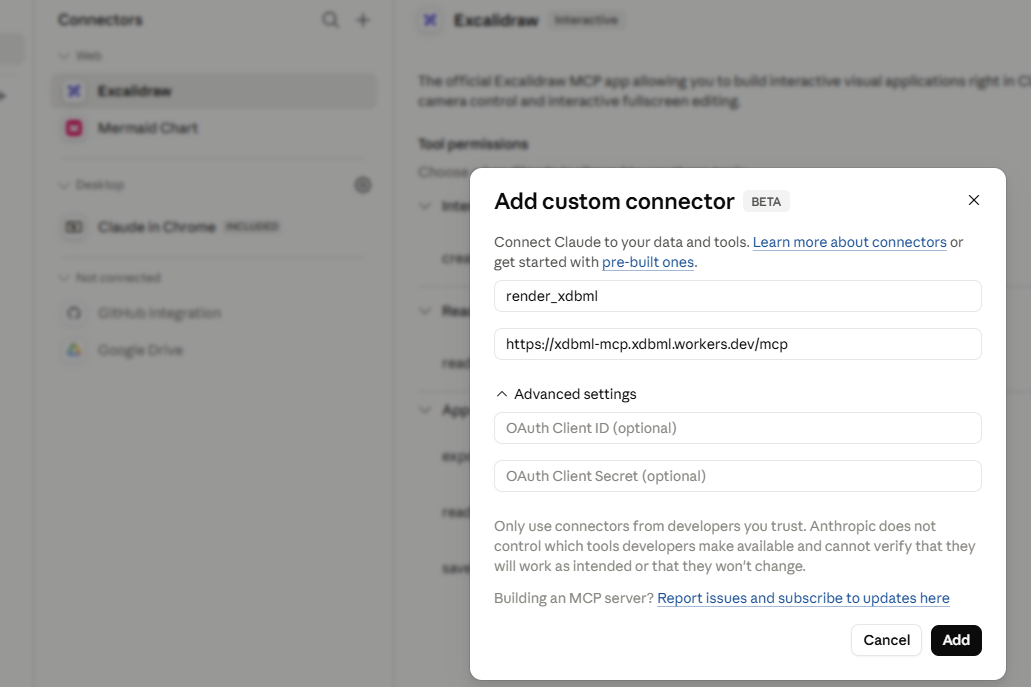
Claude then lists the tools of the server, and can call them during a conversation. You can ask Claude to design a schema, and it writes the xDBML, validates it, renders it, and gives you a link to the playground, all in one answer. The diagram does not appear in the answer itself. Open the playground link to see the diagram full size and to edit it. For example:
Using the xDBML tools, first call xdbml_reference so that you write xDBML. Then design a small library-lending schema (members, books, copies, loans, with primary and foreign keys) using xDBML constructs where they fit, and display the xDBML block. Then validate it, render it, and give me the playground link.
For an MCP client that only runs local servers, bridge to the remote server with mcp-remote. The page Use from AI assistants of xdbml.org explains how to connect ChatGPT, GitHub Copilot, Mistral Le Chat, Grok and Gemini.
Reverse-engineer in Hackolade Studio
Warning
Hackolade Studio currently imports xDBML into only a Polyglot model. Importing into physical target models is scheduled and will be rolled out progressively.
Open or create a Polyglot model before the import. The xDBML... menu item appears only when the target of the model is Polyglot.
There are 3 ways to import xDBML into Hackolade Studio: by reading a file with the extension .xdbml, by reading the clipboard into which you copied the xDBML from the response of the assistant, or by reading a file in a remote repository. In each case, one xDBML document is imported at a time. xDBML cannot be imported with the Command-Line Interface.
The objects of the xDBML document are added to the open model. When the document has a Project, its name and its note replace the name and the description of the model. Data types are converted into the closest Polyglot data type. Naming conventions, if enabled, are applied. When the model already holds a container or an entity of the same name, you are asked to keep both, replace or merge, as described in Conflict resolution during merge into an existing model.
A progress window lists each step of the reverse-engineering, the number of objects imported, and a warning for each relationship that could not be imported. When the xDBML is not valid, an error message says so, and nothing is imported. To find the exact error, paste the xDBML into the xDBML playground, then give the error message to the LLM and ask it to fix the code.
From an xDBML file
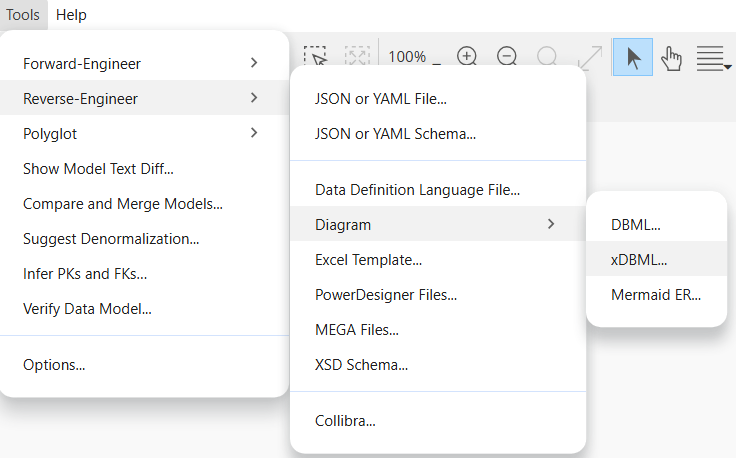
Go to Tools > Reverse-Engineer > Diagram > xDBML..., and select a file with the extension .xdbml.
From your clipboard
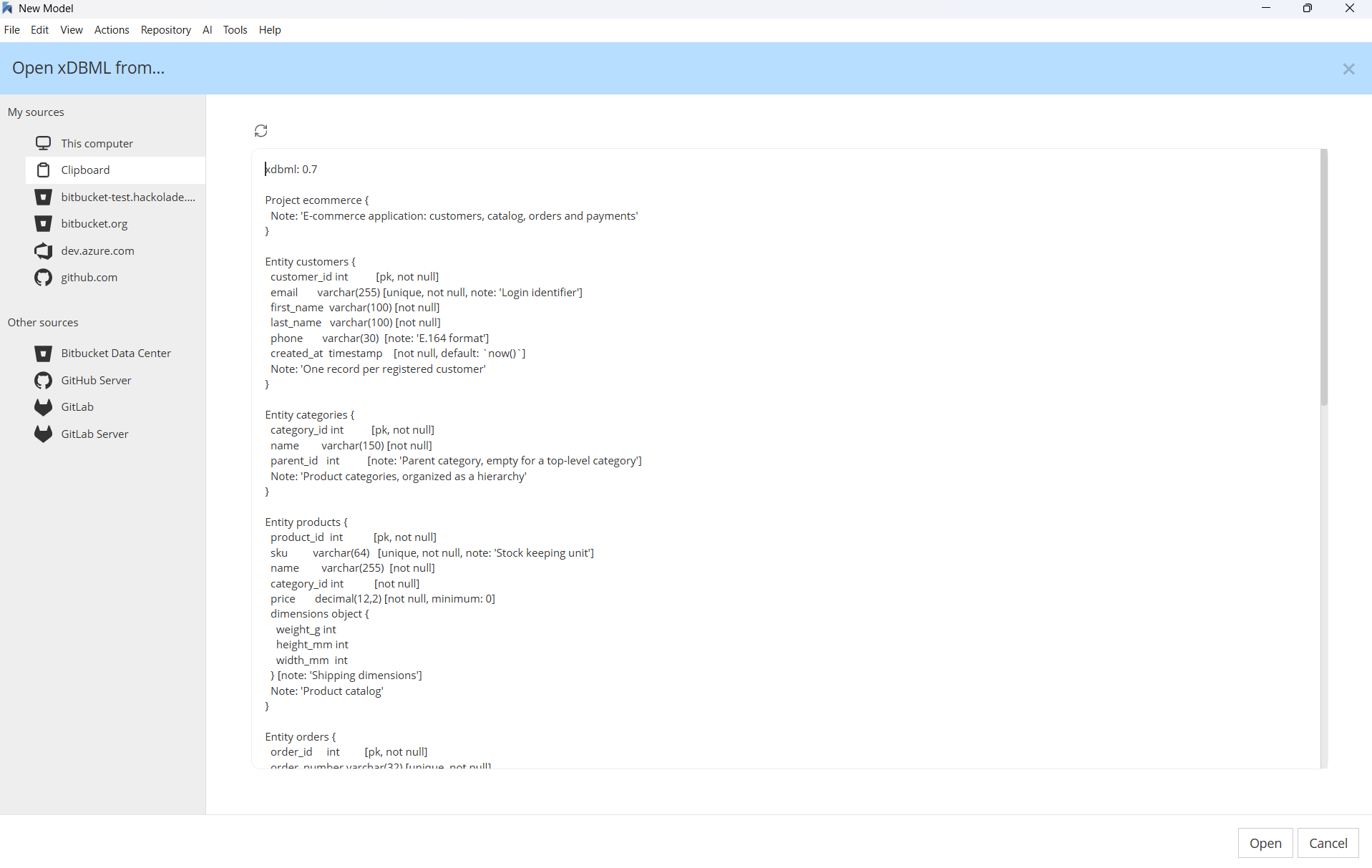
- In the response of the assistant, click the Copy button of the xDBML code block.
- In Hackolade Studio, go to Tools > Reverse-Engineer > Diagram > xDBML...
- In the Open xDBML from... dialog, choose Clipboard under My sources on the left. The dialog reads the latest entry of your clipboard. If you change the content of the clipboard, click the Refresh button to update the content of the dialog.
- Click the Open button.
From a remote repository
If you have a repository connection to a repo provider, you can select a file with xDBML in the Open xDBML from... dialog.
What Hackolade Studio imports
In this release, Hackolade Studio imports these elements of an xDBML document:
| xDBML | In the Polyglot model |
|---|---|
Project, with its name and note | Name and description of the model |
Container, and its synonyms Schema, Database, Keyspace, Namespace, Dataset and Bucket | Containers, with their name and description |
Entity, and its synonyms Table, Collection and Record | Entities, with their name and description |
| Fields | Attributes, with their name, description, data type, length, precision and scale |
not null | Required |
object { } and array [ ] | Subobjects and arrays, with their nested attributes |
pk and unique, and the keys of a constraints block | Primary key and unique keys, on one attribute or several, with their constraint names |
Ref | Relationships, with their name, description, cardinality at each end, roles and verbs. A Ref with the foreign_master setting is imported as a foreign master relationship |
View | Views, with their name, description, source query and materialized setting |
Other elements of xDBML are not yet imported. Among them are:
- the fields of a view
- relationships to or from a nested field, such as
orders.line_items.[*].product_id. Hackolade Studio skips them, and shows a warning in the progress window - default values,
increment, check constraints and indexes - validation settings, such as
pattern,minimumormaxItems - enums, named types, and polymorphic fields with
oneOforunion - edges, supertype groups, entity groups and diagram views
- AI-readiness settings: synonyms, business terms, tags and granularity
- custom properties, sample records, data lineage and sticky notes
- the targets of the
Projectand of the containers, because the model is a Polyglot model
They will be progressively deployed with upcoming releases.