

DataHub
DataHub is an open-source, governance metadata management platform, originally created at LinkedIn, that provides a comprehensive solution for data discovery, data lineage, and data governance. It helps organizations catalog and organize their data assets, allowing teams to easily find, understand, and trust the data they are working with. DataHub supports integration with a variety of data sources and provides powerful features like:
- data discovery: search, browse, and find datasets, tables, columns, and more.
- data lineage: visualize how data flows and transforms across systems and pipelines.
- data governance: manage access, ensure data quality, and track metadata across your data ecosystem.
DataHub Cloud (previously named Acryl DataHub) is the commercial version of DataHub. DataHub Cloud provides enhanced features, professional services, support, and enterprise-grade capabilities built on top of the open-source DataHub platform. DataHub Cloud offers:
- enterprise features: enhanced scalability, security, and integrations tailored for large organizations.
- Support & services: professional support, consulting, and managed services to help organizations implement and optimize their DataHub instance.
- customization & extensibility: DataHub Cloud may offer additional customization options and extensions for specific business needs.
In short, DataHub (the company) maintains and offers commercial support for DataHub (the open-source product as well as the Cloud offering), helping organizations implement and scale the open-source platform for enterprise use.
Hackolade has partnered with DataHub to provide an officially supported integration, using the standard APIs of the Generalized Metadata Service (GMS) endpoint. With this integration, users can easily publish into the DataHub data catalog, and keep their Hackolade data models synchronized.
Terminology and asset hierarchy
Each technology that we integrate with has its own vocabulary and concepts. And as often, terms don't necessarily mean the same things...
With DataHub, we can identify the following hierarchy:
Platform (e.g. Snowflake)
└── Container: Database (e.g. sales_db)
└── Container: Schema (e.g. public)
└── Datasets (e.g. tables, views)
└── Schema Metadata
└── Fields / Columns / Attributes
- Platform: represents a technology or data system instance where data resides (e.g., MySQL, BigQuery, Snowflake, Kafka). It serves as an organizational layer to categorize and group data sources based on where they are hosted or what technology stack they use. It is not a physical entity but rather an abstraction that helps with data governance, data discovery, and management by grouping related data systems.
- Container: typically used to represent a specific data model, business domain, or project. A container in DataHub cannot contain more than one database. But a container can contain multiple nested containers. As a result, a top-level container corresponds to a Hackolade Studio model, and if there are multiple Hackolade Studio containers/schemas in our model, then we create nested DataHub containers, each containing one single database/schema.
- Database: represents a logical grouping within a data source, like a schema or database instance in an actual data store (e.g., Oracle, Snowflake, etc.). Each Database can contain multiple datasets (tables, views, etc.). This would be the equivalent of our container/database/schema/keyspace/namespace/resource
- Dataset: refers to the actual data structures such as entities, tables, views, collections, or other data assets. Each Database can have multiple Datasets.
- Schema metadata assertions: defines the structure of a dataset, including its columns, types, and constraints.
- Column assertions: columns are the individual attributes/columns/fields within each Dataset (e.g., within the customer_profiles dataset, you would have columns like customer_id, first_name, email, etc.).
In a data catalog view within DataHub, you may:
- browse by platform (e.g., Snowflake).
- navigate to a container (e.g., schema).
- see datasets (tables or views) listed inside.
- each dataset exposes schema metadata and lineage.
Note that DataHub does not distinguish the physical layer from the logical layer, so we currently only publish physical models to DataHub.
| Hackolade | DataHub |
|---|---|
| Target | Platform |
| Model | Container, possibly with multiple nested containers if multiple schemas needed |
| Container/database/schema/namespace/keyspace/... | Database |
| Entity/table/view/collection/record/... | Dataset |
| Attribute/field/column | Column |
A Data Source in DataHub refers to the connection or integration to an external data system or storage platform. It can represent:
- a connection to an RDBMS like Oracle, PostgreSQL, MySQL, or cloud-based platforms like Snowflake, BigQuery, etc.
- a connection to a file-based system like AWS S3, Azure Blob Storage, or a data lake.
- any other external data store that DataHub can connect to and catalog (e.g., APIs, message queues, etc.).
A Data Source is the entry point into the data, allowing DataHub to retrieve metadata and manage the data lineage.
Although typically DataHub users start with a Data Source to harvest metadata, when publishing Hackolade Studio data models to DataHub, it is possible to create a container without attaching a data source to it. This is particularly useful when publishing data models to business users prior to deploying the solution.
DataHub supports primary key constraints (including composite/compound keys) and foreign key relationships (also composite). While it doesn’t enforce data integrity, it captures this metadata for catalog purposes.
DataHub URNs
Our integration with DataHub leverages the DataHub URN (Uniform Resource Name) to keep data in DataHub up-to-date with model evolutions when invoking the integration repeatedly. DataHub URNs are immutable identifiers. They must remain unchanged once assigned to an entity. This immutability is fundamental to maintaining data integrity, lineage tracking, and consistent references throughout the system. Once a URN is created, it should never be modified, even if the underlying data asset's attributes change.
URNs can serve dual purposes - they are both internal system identifiers AND they can be visible user-facing identifiers in the DataHub UI. This situation can create conflicts when organizational taxonomy (domains, products, systems) changes. The solution is to separate technical identifier from business context.
When we publish data models to DataHub, we create the URNs and generally follow the DataHub best practices for platform instance naming. The goal is to assemble URNs that are not subject to change even if you change names in the Hackolade Studio data model.
Containers
We follow the logic described in this page. The URN is generated in format urn:li:container:{guid}. The GUID is generated from the hashed data:
- Database containers: platform + instance environment + database name
- Schema containers: platform + instance environment + database + schema name
Datasets
We follow the logic described in this page. The URN is generated in format urn:li:dataset:(urn:li:dataPlatform:snowflake,{database}.{schema}.{table/view},{env})
The URN format is the same for tables and views.
Queries
We follow the same logic as DataHub ingestion, which is partially described in this page. The unique identifier of query is obtained by hashing the view URN in a specific way. Then the URN is generated in format urn:li:query:view_{id}.
The creation of queries is necessary when we publish views, so that we connect the views and their columns with the underlying tables. It is done by creating a Query entity.
Note: DataHub changed the way it generates the Query URN in 1.5.0, see the release notes. Hackolade can generate both formats of URNs depending on the ingestion version, using the value in the GMS config with the flag managedIngestion.defaultCliVersion. If the version is <1.5.0, Hackolade uses URL encoding, otherwise, we use the SHA-256 hash. When the version cannot be obtained for some reason we default to SHA-256 hash.
Roles, privileges, and permissions
DataHub provides the ability to use Roles to manage permissions. To be allowed to publish a data model to DataHUb, you must be able to create DataHub assets. The out-of-the-box Roles represent the most common types of DataHub users. Currently, the supported Roles are Admin, Editor and Reader.
A Reader role can read all the metadata, but cannot create anything. An Admin role can do everything on the platform, but data modelers will rarely have this role.
The Editor role can read and edit all metadata. It would be sufficient to create DataHub assets when publishing a Hackolade Studio data model. Except for the fact, that a standard Editor role cannot create query entities which are necessary to publish the view lineage to its underlying tables.
Assuming that the user has been granted the Editor role, following these instructions, it is also necessary to add a Create Entity privilege to the Editor role, following these steps:
- go to Settings > Permissions > Policies
- click "Create new policy"
- give a name and click "Next"
- in the Privileges select "Create Entity" and click "Next"
- in the last screen select the user or group and click "Save"
Publish data model to DataHub
The application uses the standard DataHub APIs to load the selected objects metadata onto your DataHub instance.
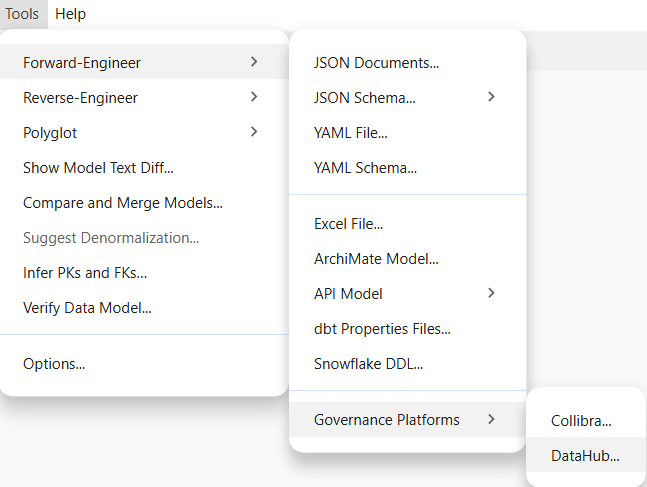
To publish a model, go to Tools > Forward-Engineer > Governance Platforms > DataHub...
Connection and authentication
If you already have connections, select the one corresponding to the instance where you wish to publish your model
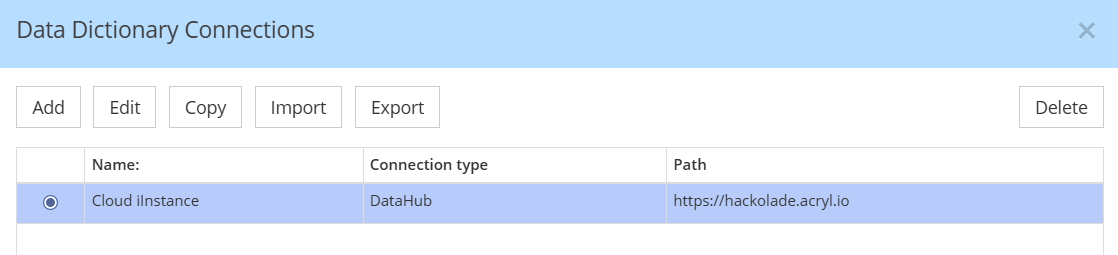
If you don't already have a connection set up, you must create one
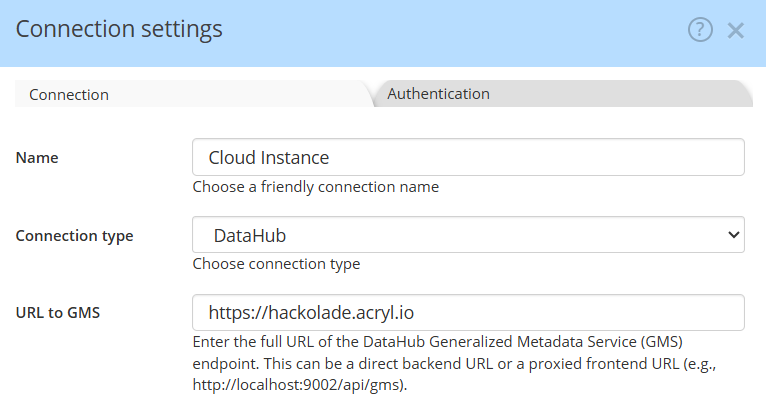
Enter the complete URL for the DataHub Generalized Metadata Service (GMS) endpoint. If you are using a cloud-based service, simply provide the cloud address (e.g., https://mycompany.acryl.io). For self-hosted setups, specify the full URL to the backend or the proxied frontend, including the port number and the /api/gms extension. This should be a complete URL pointing directly to the GMS, such as http://localhost:9002/api/gms
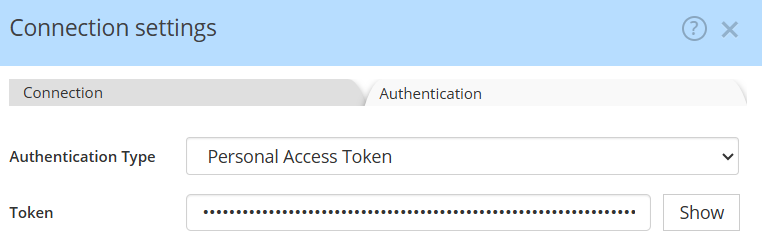
For authentication, we will soon provide OAuth for DataHub Cloud. Currently, you must first create a Personal Access Token. Your user must have a minimum of Editor rights to be allowed to publish data models to DataHub. The role Reader is not sufficient.
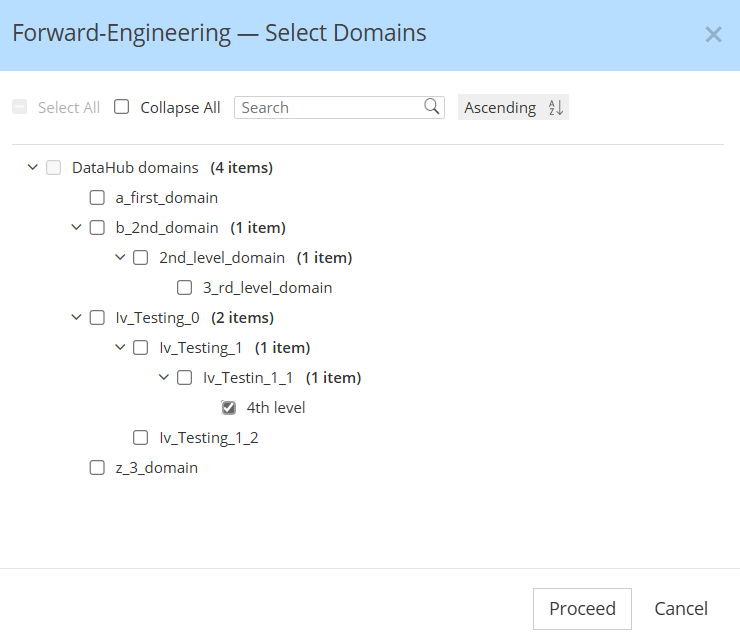
Select the DataHub domain where to publish your data model
DataHub supports grouping data assets into logical collections called Domains. Domains are curated, top-level folders or categories where related assets can be explicitly grouped.
When publishing a Hackolade Studio data model to DataHub, the assets are assigned to the domain of your choice. A dialog fetches the domains from your DataHub instances to allow to chose the domains where you want the model to be published:
Select schemas and tables to publish
You may publish the entire model, or selectively choose a subset, then click Submit
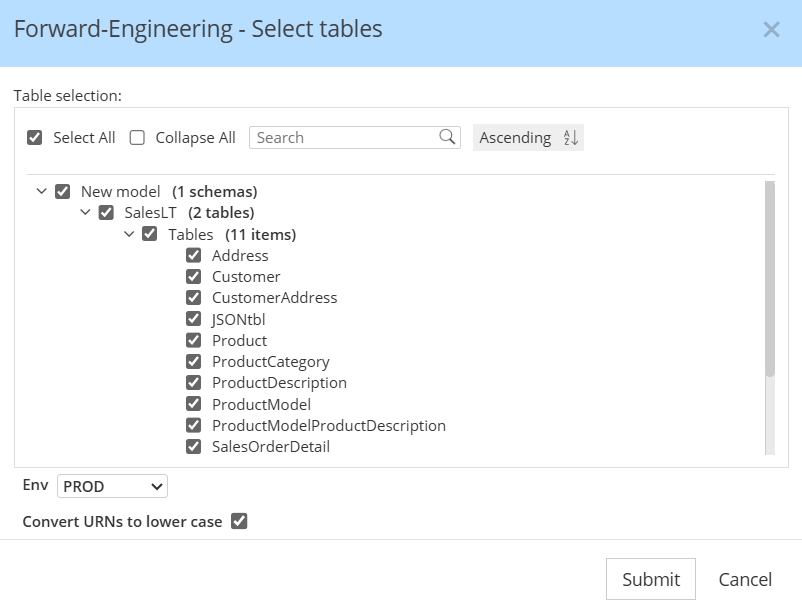
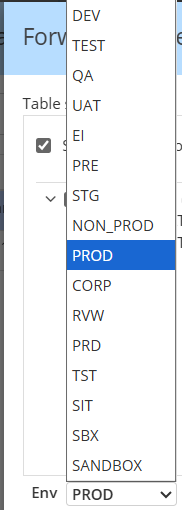
In DataHub, "Env" refers to the Environment (e.g., PROD, DEV, STAGING) where a dataset for a Platform Instance resides, acting as a qualifier to differentiate datasets with similar names across platforms. You may choose among a pre-defined list of FabricTypes. Our default is PROD.
By default in the ingestion recipe of DataHub, the flag convert_urns_to_lowercase is set to true but the value of that flag can be changed in your instance. If that's the case, you have the possibility to uncheck the box when publishing the model, in order to generate the URNs in the same way the DataHub does.
Visualize your data model in the DataHub application
The data model information can immediately be viewed inside DataHub. Simply go to the Home page, and look at the Platforms pane, then select the target for which you just published your data model, or type the name in the search bar:
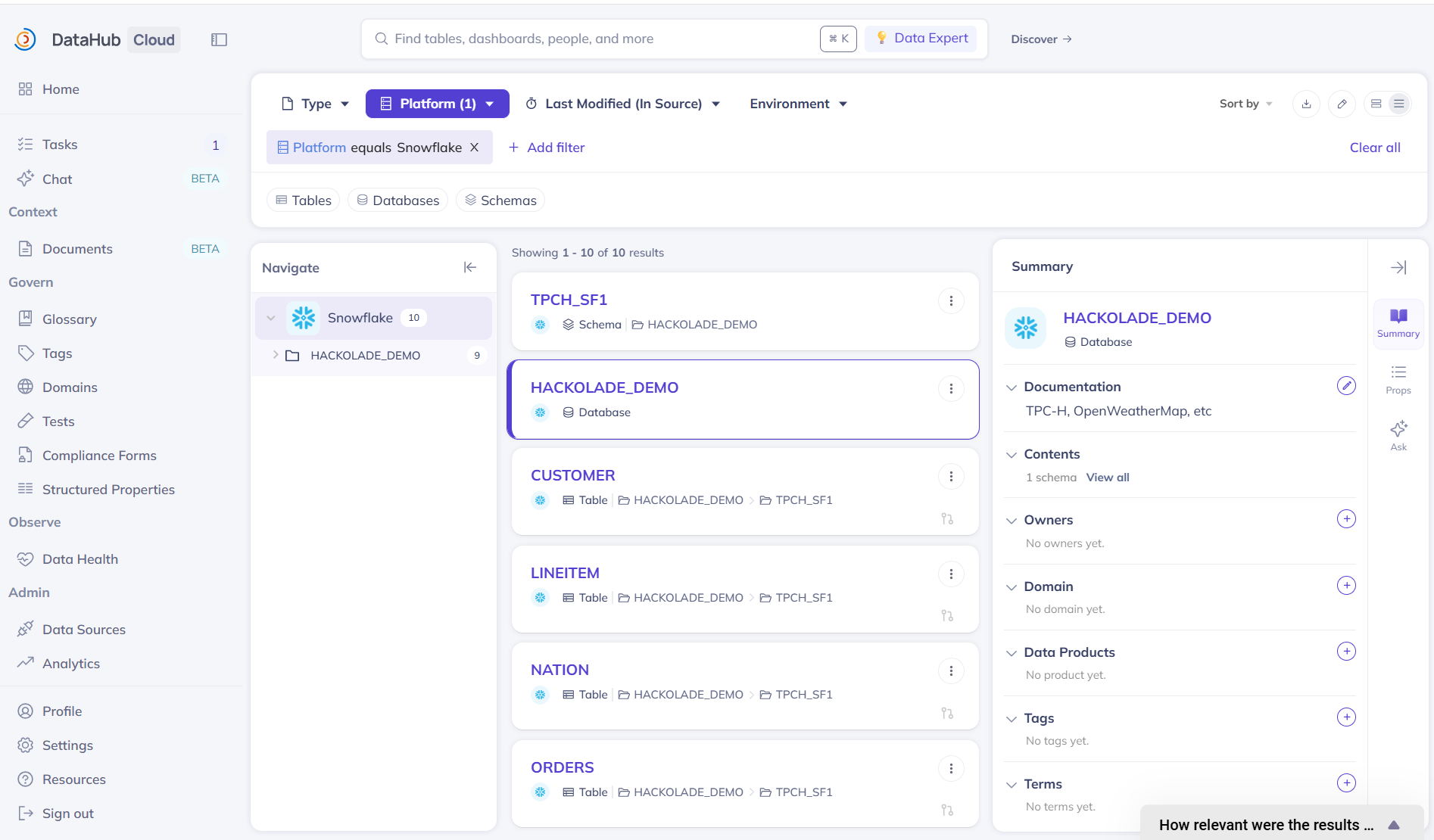
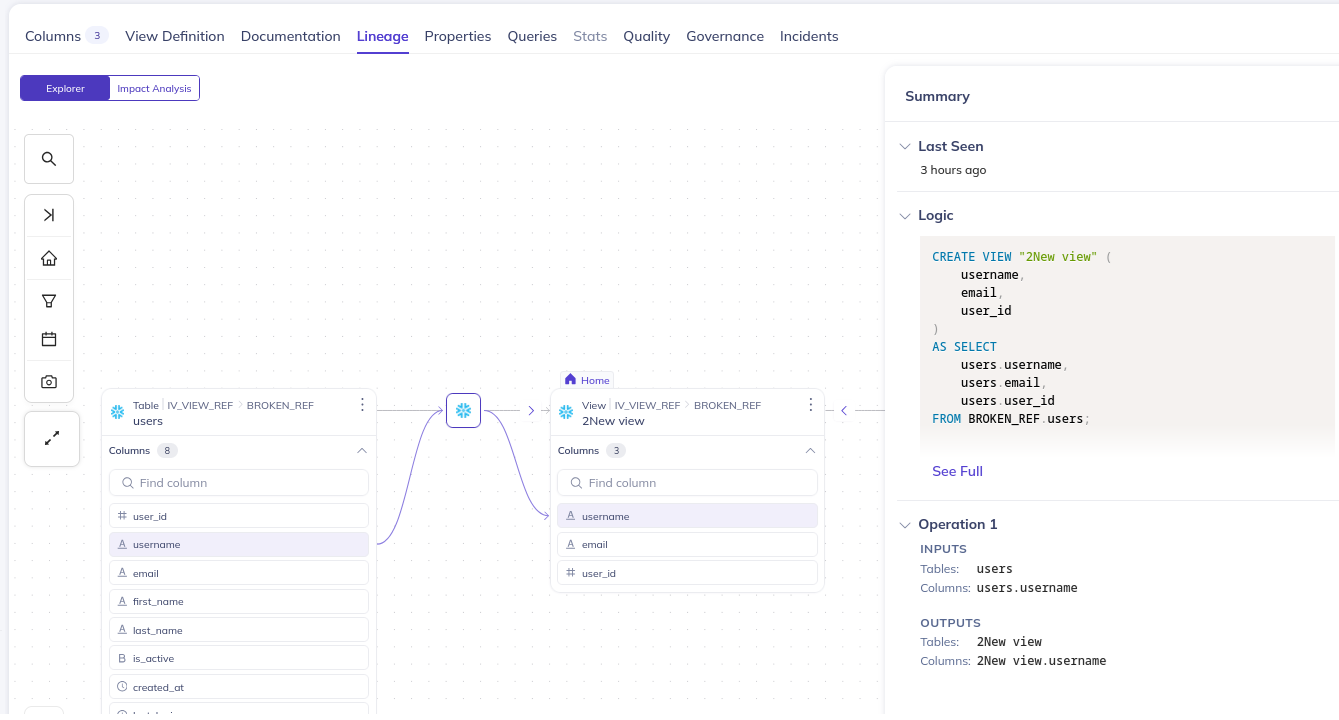
When we publish a view, we also publish the lineage to the underlying table:
Custom properties (TBA)
You may configure custom properties in the DataHub platform. They are configured similarly to what we have in Hackolade Studio. The property is defined on specific level (Container, Dataset, Column etc.) and can have different value types.
If the custom property is configured in DataHub and Hackolade Studio with the same name (propertyKeyword in Hackolade and Qualified name in DataHub) and relevant type, the publishing forward-engineers this property to DataHub. If the name is the same, but type is not compatible a warning is displayed, and we skip this property.