

Common to dbt models and sources
Data tests
dbt data tests are validation rules that run against your data to check quality and integrity. They are declared in the property file alongside the model or source and executed with the dbt test command.
Hackolade Studio generates data tests in two ways: automatically from constraints already defined in your model, and manually via free-text entries in the dbt tab at column level. Both approaches work for models and sources.
Auto-generated tests from constraints
When forward-engineering, check the Generate data tests from constraints option in the dialog to let Studio produce dbt data tests automatically from the constraints defined in your model. No extra configuration is needed in the properties pane, Studio reads what is already there.
The following mapping is applied:
| Hackolade constraint | Generated dbt data test |
|---|---|
| Primary key | not_null + unique |
| Not null / required | not_null |
| Unique (non primary key) | unique |
| Enum values | accepted_values with the list of allowed values |
| Foreign key | relationships with the referenced model and column |
Tests are placed at column level in the generated YAML, which is the recommended style in dbt. Studio uses the data_tests: syntax introduced in dbt v1.8 and the arguments: syntax for tests with parameters (dbt v1.10.5+).
models:
- name: orders
columns:
- name: order_id
data_tests:
- not_null
- unique
- name: status
data_tests:
- accepted_values:
arguments:
values: [placed, shipped, completed, returned]
- name: customer_id
data_tests:
- relationships:
arguments:
to: ref('customers')
field: customer_id
Global test options
When Generate data tests from constraints is enabled, 3 optional settings appear in the forward-engineering dialog and applied uniformly to all generated tests:
- Severity (warn or error): Controls whether a test failure blocks the run or only raises a warning.
- Store failures: when enabled, dbt stores the rows that failed the test in a table for inspection.
- Limit: limits the number of failing rows stored (only relevant when store failures is enabled).
columns:
- name: order_id
data_tests:
- not_null:
severity: warn
store_failures: true
limit: 50
Additional tests
For tests that go beyond the 4 built-in dbt tests, such as tests from packages like dbt-utils or custom macros, you can add free-text YAML fragments directly in the dbt tab at column level.
Each additional test is added via the + button in the dbt tab. Studio validates that each entry is well-formed YAML, but does not verify that it is a valid dbt test.
Ensuring the fragment makes sense in context remains your responsibility. Entries are appended to the column's data_tests: list after any auto-generated tests.
Note: make sure any referenced tests or packages are available in your dbt project.
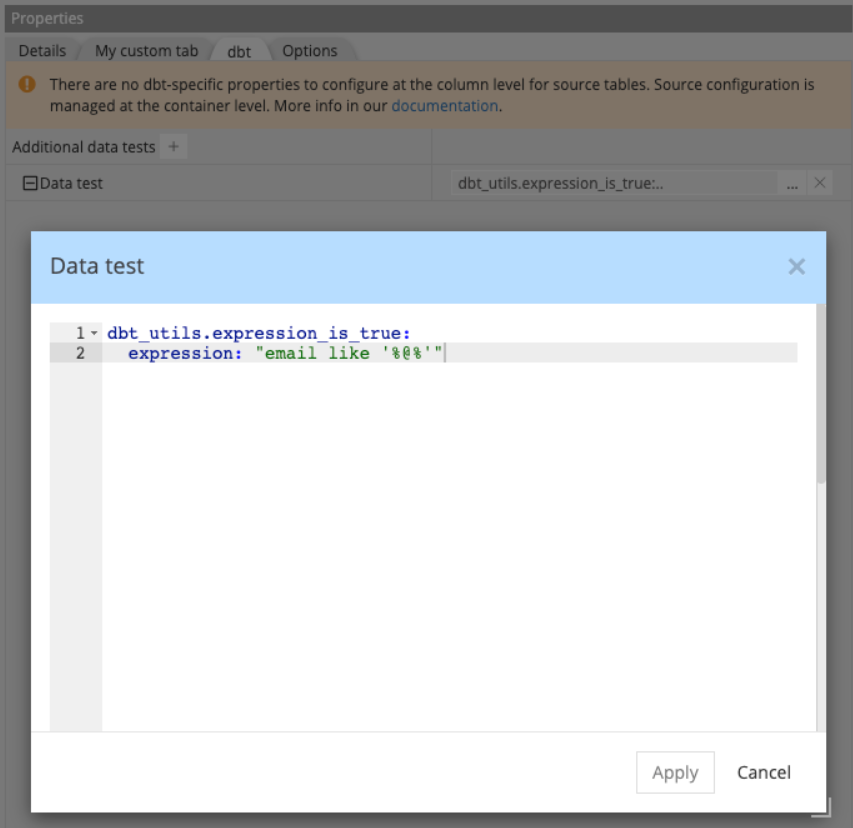
columns:
- name: email
data_tests:
- not_null
- dbt_utils.expression_is_true:
expression: "email like '%@%'"
Note: there is no distinction between package tests and custom macros at this stage: both are entered as free-text in the same field.
Custom headers and footers
For cases where the generated YAML is not enough on its own, Hackolade Studio lets you inject free-text YAML content before and after the generated output, at container level and at entity level.
This is useful for adding dbt configuration blocks, comments, or any valid YAML that Studio does not generate natively.
Note: Hackolade Studio validates that the injected content is well-formed YAML. However, it does not verify that the content is semantically valid for dbt. Ensuring the injected YAML makes sense in context remains your responsibility.
Where to define them
Headers and footers are defined in the dbt tab of the properties pane:
- Container level: available for all containers, whether they are source groups or dbt-model containers
- Entity level: available for entities that belong to a model container (not source groups)
Output order
When forward-engineering, content is assembled in the following order:
container header
entity header
generated content entity footer
container footer
Note; Entity-level headers and footers are ignored when generating one file per schema rather than one file per entity.
Example
The most common use case for a container-level header is adding additional dbt resource declarations, such as exposures: or metrics: , in the same file as the generated models or sources. A models.yml file can contain multiple dbt resource types alongside the generated content.
exposures:
- name: weekly_finance_report
type: dashboard
owner:
email: finance@company.com
depends_on:
- ref('orders')
version: 2
models:
- name: orders
description: One record per order
columns:
...
For an entity-level header (only applicable in one-file-per-entity mode), a typical use case is adding a YAML comment block for documentation or governance purposes, before the entity definition:
# Owner: finance-team
# Refresh: nightly
# SLA: data available by 06:00 UTC
version: 2
models:
- name: orders
description: One record per order
columns:
...