

Default paths and file picker behavior
Depending on the features you use, Hackolade Studio may prompt you to select a file or a folder using the native file picker of your operating system. This happens in many situations, such as opening a model, performing reverse-engineering from files, generating artifacts, exporting documentation, or selecting auxiliary resources.
This page explains how to configure the default paths and how the file picker behaves.
Note: the behavior of File > Open, and File > Open From, and opening models from remote repositories is documented separately and is not repeated here.
Default paths configuration
In Tools > Options > Default Paths, you can configure a default folder for many features in Hackolade Studio. Each entry corresponds to a specific action where a file or a folder must be selected:
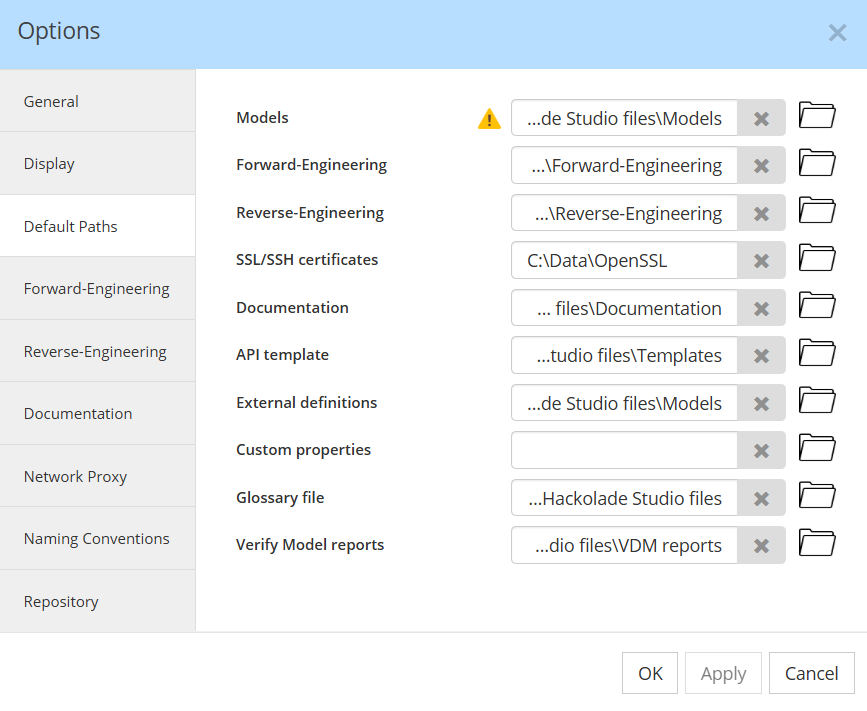
Defining a default path is optional. When configured, it tells Hackolade Studio where the file picker should start the first time that feature is used.
File picker default location
When you use a feature for the first time, Hackolade Studio opens the file picker at the default path configured for that feature, if one exists. This gives you a clear and predictable starting point.
From that moment on, Hackolade Studio simply follows your navigation. If you select a file or folder in another location, Hackolade Studio remembers that choice. The next time you use the same feature during the same session, the file picker opens exactly where you were last time.
Default paths are therefore only used as an initial entry point. Once you start working, Hackolade Studio stays aligned with where you are located, instead of forcing you back to a predefined folder.
Important note: Workgroup Edition and opened repository. There is one special case when selecting a data model. If a repository is currently open, Hackolade Studio opens the file picker directly at the root of that repository. This ensures that model selection stays consistent with the active repository.