Pre-populate properties with default values
Hackolade Studio allows to define default values for specific properties such as view names, index names, or constraint names through a configuration file. This equates to what other tools often accomplish with macros or scripting.
These defaults are defined in the defaultData.json configuration file in each plugin, at .hackolade/OPTIONS/<target>/customProperties/properties_pane. You can easily access that location via Help > Plugin Manager and then "Show plugin customization directory.":
When configured, the default value is automatically applied at the time of object creation. For example, when creating a new index or constraint, Hackolade Studio assigns the configured default value to the corresponding property.
This mechanism is intentionally static and non-dynamic:
- the default value is applied only once, during creation.
- if the property is manually modified afterward, Studio does not override it.
This behavior is designed to prevent unintended overwrites and avoid conflicts with user customizations.
Example of defaultData.json
THes list below is comprehensive. Not all options may be relevant in your case. You may select a subset of the example below, and configure for your specific needs.
For example, with the configuration below:
-
for each level (model, container/schema, entity/table/collection, attribute/column/filed, relationships, and view), generate as default:
- a business name
- a technical name with the respective prefix MODEL_, S_, T_, F_, V_, FK_
-
an index gets _IDX as its default name
-
a check constraint gets _CC as its default constraint name
-
a composite primary key gets _PK as its default constraint name
-
a composite unique key gets _UK as its default constraint name
-
a NOT NULL constraint on a field gets _NN as its default name
-
a single unique key gets _SUK as its default constraint name
-
a single primary key gets _SPK as its default constraint name
These values are fixed prefixes or suffixes defined in advance. They are not dynamically derived from contextual properties such as entity name or attribute name.
For example, a NOT NULL constraint created on a field with types value customer_id will receive _NN, not customer_id_NN.
For foreign key relationships, the value shown here (FK_) corresponds to the static default defined in defaultData.json when a foreign key relationship is not created by drag-and-drop. A more advanced, pattern-based configuration is available and described in the dedicated section below.
{
"model": {
"modelName": "My model",
"code": "MODEL_"
},
"container": {
"name": "My schema",
"code": "S_",
"synonyms": {
"synonymName": "_SYN"
},
"sequences": {
"sequenceName": "SEQ"
}
},
"collection": {
"collectionName": "My table",
"code": "T",
"Indxs": {
"indxName": "_IDX"
},
"chkConstr": {
"chkConstrName": "CC"
},
"primaryKey":{
"constraintName": "PK"
},
"uniqueKey":{
"constraintName": "UK"
}
},
"view": {
"name": "My view",
"code": "V"
},
"relationship": {
"name": "My relationship",
"code": "FK"
},
"field": {
"name": "My column",
"code": "F",
"notNullConstraintName": "_NN",
"uniqueKeyOptions": {
"constraintName": "_SUK"
},
"primaryKeyOptions": {
"constraintName": "_SPK"
}
}
}
Note that this static approach may not be ideal if you have Naming Conventions enabled.
Advanced naming for foreign key relationships created by drag-and-drop
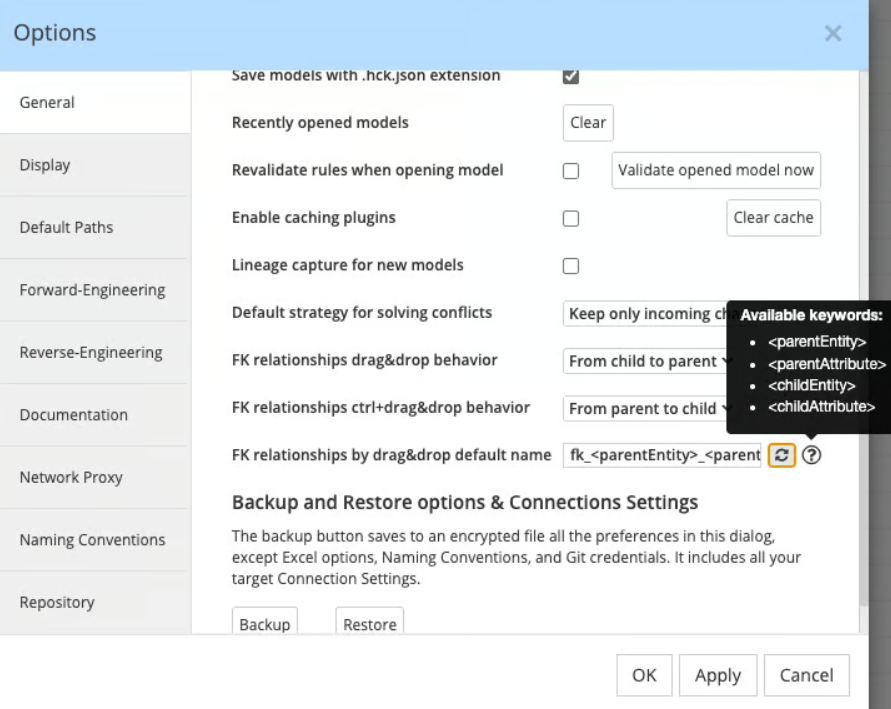
In addition to the static default value defined in defaultdata.json, foreign key relationships support a advanced flexible naming mechanism when created via drag and drop.
In Tools > Options, a naming pattern can be defined using predefined keywords. The following variables are supported:
- <parentEntity>
- <parentAttribute>
- <childEntity>
- <childAttribute>
These keywords allow composing a relationship name dynamically based on the actual modeling context. For example, a pattern such as:
FK_<childEntity>_<parentEntity>
would generate a name derived from the involved entities at creation time.
This dynamic naming mechanism applies only when the relationship is created via drag and drop, and only at initialization time. After creation, the name behaves like any other property and is not automatically updated if the model changes.