

OAuth setup with Entra ID
This page is relevant for Hackolade Studio client connection to a Collibra instance using an identified user. It does not apply to a server or CLI instance of Hackolade Studio establishing a machine-to-machine connection to Collibra using a service account.
1. Register an Application in Microsoft Entra ID
Note: we start by the setup in Azure Entra ID
-
Go to Azure Portal > Microsoft Entra ID > App registrations
-
Click New registration
- Configure:
- Name (example): Collibra Integration
-
Supported account types: usually Single tenant
-
After creation:
- Save Application (client) ID
- Save Directory (tenant) ID
More detailed instructions in the official Microsoft documentation
2. Configure API Permissions of the Application
-
Go to API Permissions in the left panel
-
Add:
- User.Read (required)
- openid profile offline_access (optional)

- Click Grant admin consent
3. Retrieve OpenID Configuration from the Overview of the Application
Copy the Entra well-known endpoint:
https://login.microsoftonline.com/{tenant-id}/v2.0/.well-known/openid-configuration
Or:
Go to Overview > Endpoints
Copy and open the link from the OpenID Connect metadata document
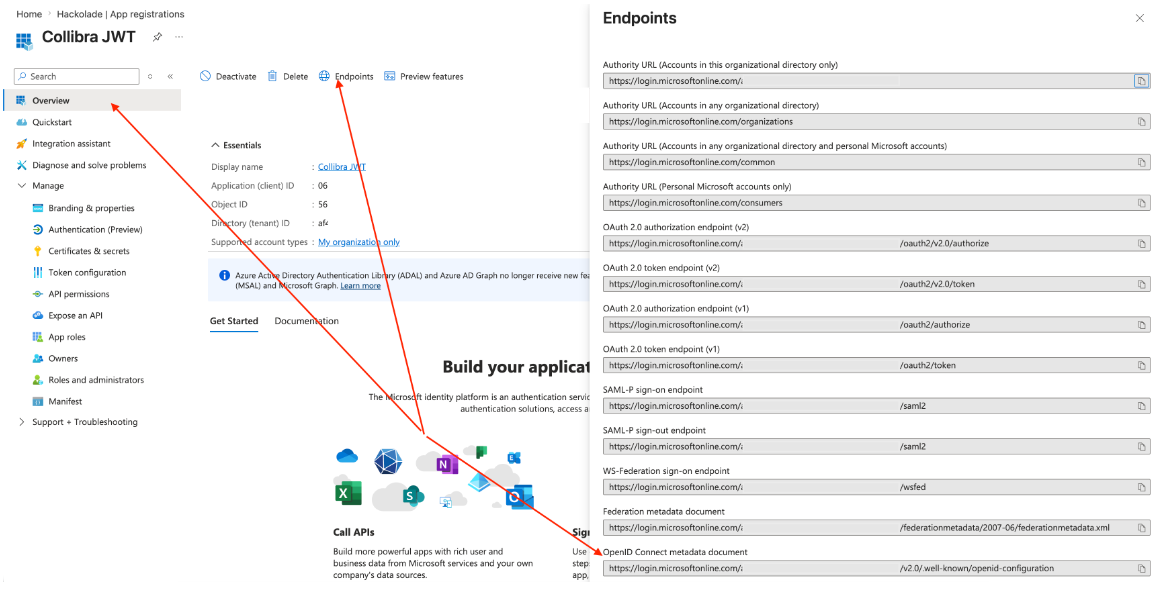
From this JSON, extract:
- jwks_uri → used in Collibra
- issuer → used in Collibra
4. Map Values to Collibra Configuration
Note: need to configure Collibra using Collibra console
1. Open Collibra console: https://console-{company-domain}.collibra.com
2. Select your environment -> Data Governance Center > Configuration > Security configuration > JWT
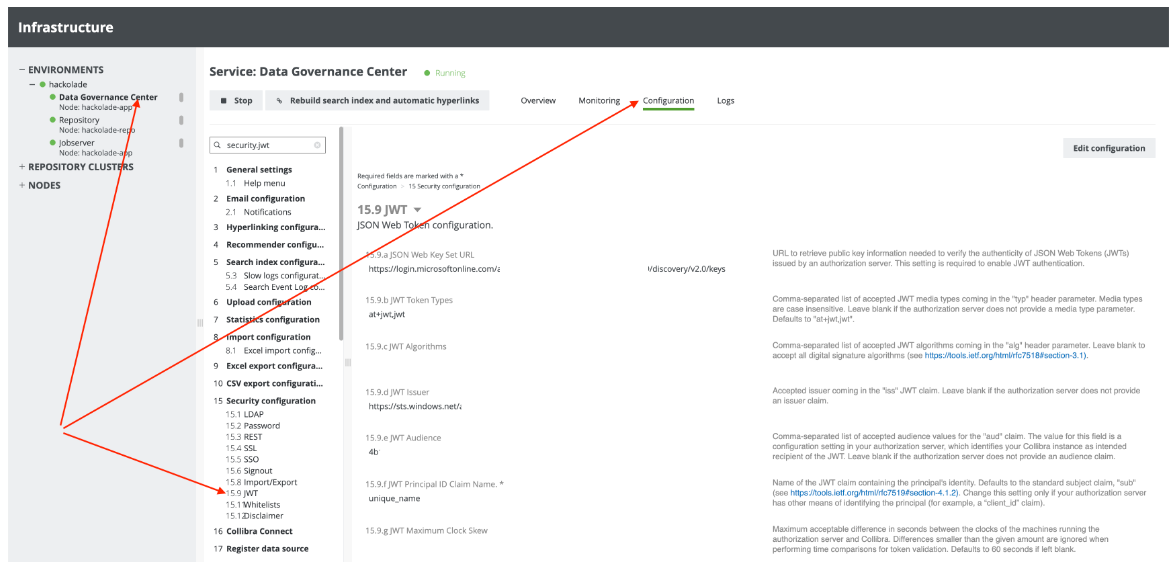
Next properties should be mapped:
| Collibra JWT property name | From Entra ID | Example | Comment |
|---|---|---|---|
| JSON Web Key Set URL | jwks_uri - from well-known endpoint endpoint | https://login.microsoftonline.com/{tenant-id}/discovery/v2.0/keys | |
| JWT Token Types | at+jwt,jwt | Keep default Collibra's value (if not changed token configuration in Entra ID) | |
| JWT Algorithms | RS256 | Leave it blank (if not changed token configuration in Entra ID) | |
| JWT Issuer | issuer - from well-known endpoint endpoint | https://login.microsoftonline.com/{tenant-id}/oauth2/v2.0/token | |
| JWT Audience | from Access token for Entra ID application | To determine the JWT Audience, retrieve an access token from Microsoft Entra ID and decode it (for example, using jwt.io or Postman). Use the value of the audience claim from the token. Note: In some configurations, the Application ID URI may not be defined. In such cases, the audience is determined by the resource requested during token generation, so decoding the token is the only reliable method. | |
| JWT Principal ID Claim Name | One of the supported values from claims_supported - from well-known endpoint endpoint | preferred_username | Ensure a Collibra internal user exists Username must match this claim value |
| JWT Maximum Clock Skew | Leave it blank |