

Target-specific
Forward-engineering scripts vary widely between target technologies, as each one has developed its own storage model, terminology, syntax, data types, indexing and partitioning, etc.For details, you should consult the applicable page
Note: this capability is only available in the Professional, Workgroup, and Free Trial editions of Hackolade Studio.
Script generation parameters
With v8.2.3, we started to introduce parameters to allow you to adjust the DDL script generation according to your preferences. This may be for styling purposes, or more importantly for data loading or performances reasons. Additionally, it may allow you to document data models constraints that you do not want to have enforced by the database engine.
The configuration is available from Tools > Options > Forward-Engineering > Script Generation:
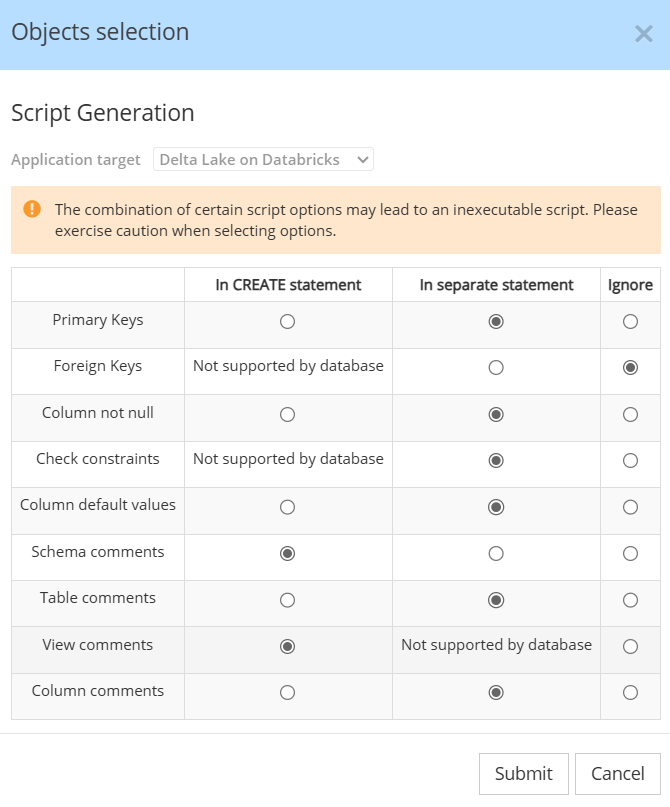
It is also available from a button at the bottom of the DDL script tab, and from a button at the bottom of the forward-engineering table selection dialog.
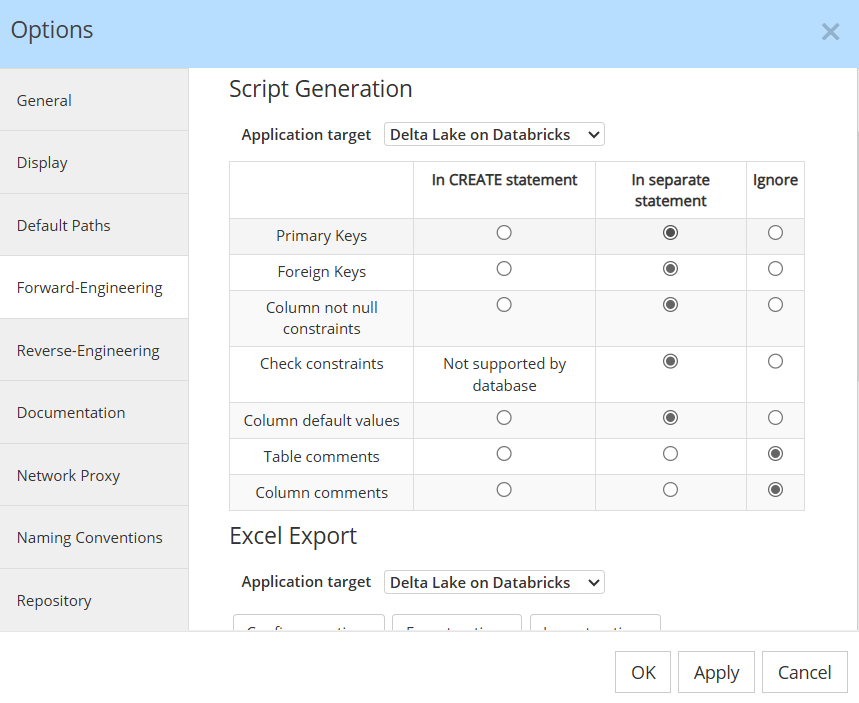
Script generation parameters are persisted in a JSON file script-generation-options.json stored in the C:\Users\Pascal\.hackolade\options\<target> folder.
Script generation parameters when using the CLI
When running the Command-Line Interface locally, it accesses the same configuration file as persisted by editing your preferences in the GUI application, i.e., the file script-generation-options.json stored in the C:\Users\Pascal\.hackolade\options\<target> folder.
When running the CLI on a server, you must copy the script-generation-options.json file and paste in the appropriate .hackolade\options\<target> folder of the CLI instance.
If running the CLI in Docker, you must paste the script-generation-options.json file in the appropriate location, as described here.
Custom script hooks
Warning: hooks execute raw SQL and may impact the stability of the generated script if misused. They bypass the modeling layer, are not visible in the data model, and may introduce inconsistencies (missing constraints, undocumented structures, privilege issues, or execution-order problems). For structural elements such as audit columns or additional tables, it is strongly recommended to model them explicitly in the tool so they are generated consistently, documented, and governed by the standard DDL engine.
The custom script hooks feature allows you to inject custom content (such as statements or comments) at predefined points in the generated DDL script. Instead of manually editing the generated script after export, you can define custom content that is automatically inserted before or after specific CREATE operations.
ALTER comparison scripts of delta models for custom script hooks is supported for the Oracle target, and not yet for other SQL and SQL-like targets.
Hook points
You can insert custom content at predefined positions in a DDL script:
- Before all statements
- After all statements
- Before a specific CREATE SCHEMA statement
- After a specific CREATE SCHEMA statement
- Before each CREATE TABLE statement
- Before a specific CREATE TABLE statement
- After each CREATE TABLE statement
- After a specific CREATE TABLE statement
- Before each CREATE VIEW statement
- Before a specific CREATE VIEW statement
- After each CREATE VIEW statement
- After a specific CREATE VIEW statement
These hook points define where your custom content is placed relative to the corresponding CREATE operation.
Customization levels
Custom script hooks can be defined at different levels. The level determines the scope of application.
Model level
Applies to all schemas, tables, and views within the model. Use this level to enforce global standards across the entire script.
Schema level
Defined on a schema (database). Applies to that schema, all tables and views inside that schema. Use this when you want consistent behavior within a specific schema.
Table / View level
Defined directly on a specific table or view. Applies only to that object. Use this when customization is object-specific.
Level priority and execution order
When hooks are defined at multiple customization levels, they are cumulative.
For the same hook point:
- Before hooks execute from the highest level to the most specific level.
- After hooks execute from the most specific level to the highest level.
This ensures a consistent and predictable ordering when combining model, schema, and object-level definitions.
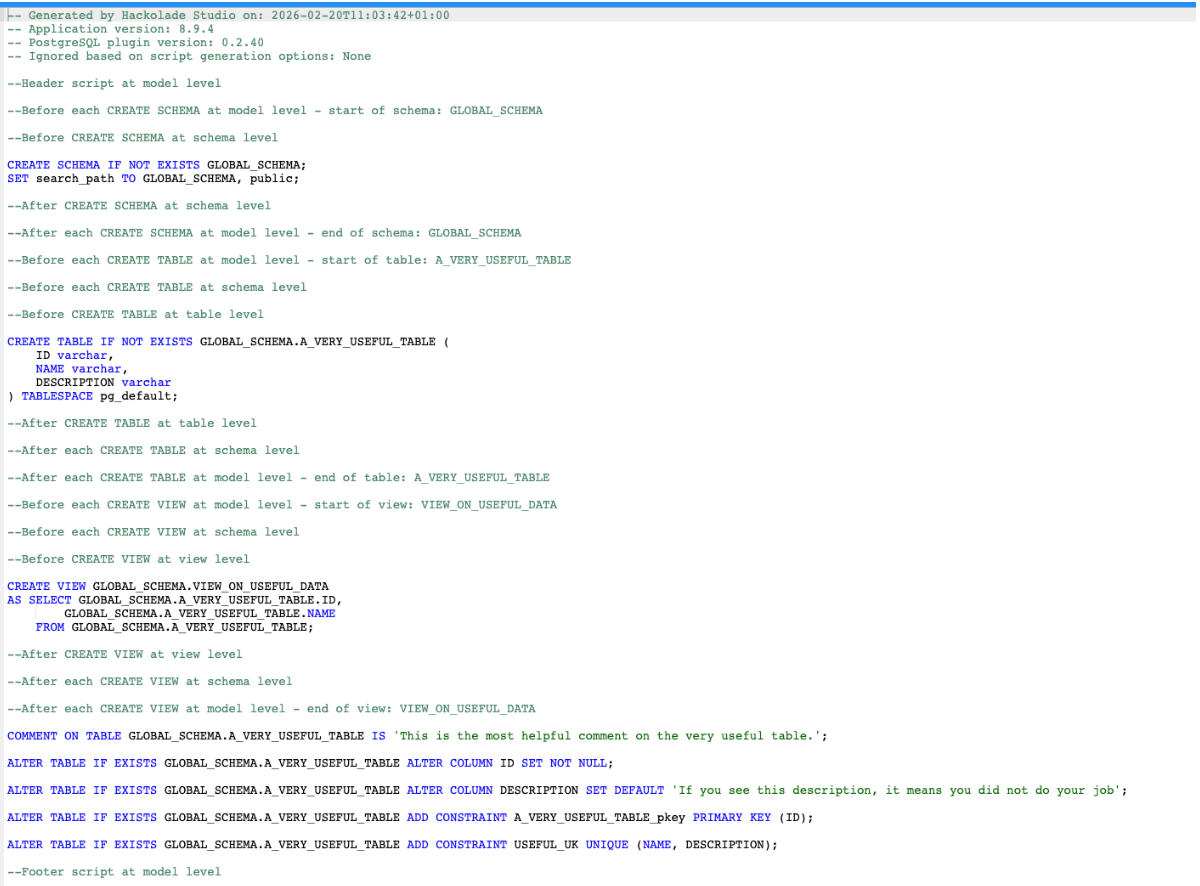
When table constraints are configured to be generated as separate statements (see Script Generation Options), the After CREATE hook is inserted immediately after the CREATE statement itself. It does not include the subsequent ALTER statements, which are placed later in the script.
Note that "After CREATE SCHEMA" follows the same principle: it is executed immediately after the CREATE SCHEMA statement itself, not after all objects within that schema. If you need to insert content at the very end of the entire script, use the model-level Footer script instead.
The example screenshot illustrates a complete model where hooks are defined at all available levels. It shows both the priority between levels and the resulting execution order across schemas, tables, and views.
Using variables
Custom scripts can use predefined variables. These are resolved automatically during script generation. This allows you to write reusable scripts without hardcoding object names.
Supported variables:
- ${schemaName} – current schema, database, or equivalent container
- ${tableName} – current table name
- ${viewName} – current view name
The exact variable names can differ depending on the target (for example, schema vs database vs user). The list of supported variables for the selected target is displayed in the footer of the Custom script hooks dialog. Variables can be copied directly from the tooltip to avoid typing errors.
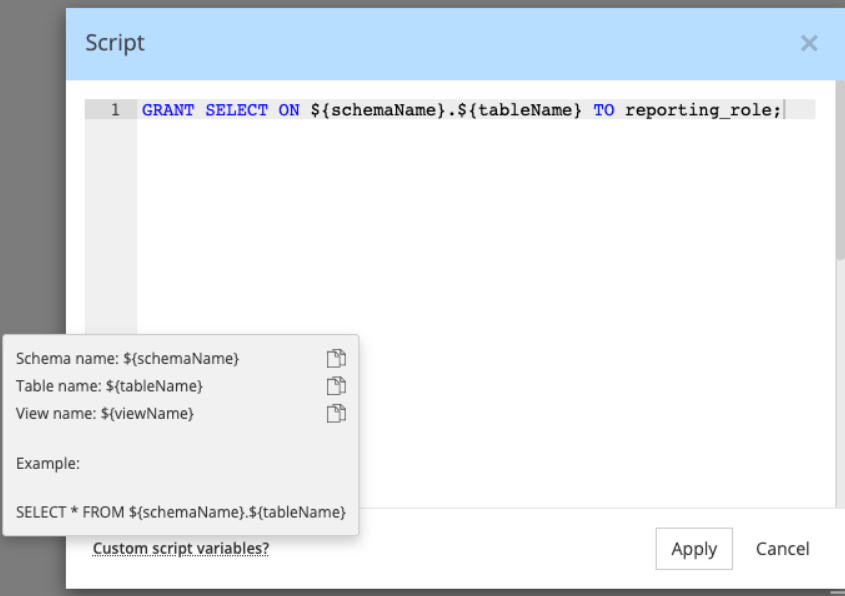
If a variable is used outside of its applicable scope (for example, ${tableName} at model level), it is not resolved and is replaced with an empty value in the generated script. Any unknown or invalid variable is also ignored and replaced with an empty value.
Example scenarios
Grant privileges automatically:
GRANT SELECT ON ${schemaName}.${tableName} TO analytics_role;
Add logging:
CALL log_object_creation('${tableName}');
Add comment:
COMMENT ON TABLE ${schemaName}.${tableName} IS 'Managed by Hackolade';
Important notes:
Custom scripts extend generated DDL. They do not replace CREATE statements.
Injection happens at deterministic points in the final assembled script.
The feature affects DDL script generation only. Other exports (JSON, YAML, ArchiMate, etc.) are not impacted.
Delta model alter scripts are not yet supported.