

Associative entities for many-to-many relationships
An associative entity or table is the standard relational way to physically represent a many-to-many (N:M) relationship between two entities.
At the conceptual and logical levels, modeling a many-to-many relationship is perfectly valid, and is often the most natural way to express business reality. For example, a student can enroll in multiple courses, and a course can include multiple students.
However, relational databases cannot implement many-to-many relationships directly. At the physical level, the relationship must be materialized as an associative table (also called a junction or linking table), with foreign keys referencing both entities.
This normalization rule is known as Second Normal Form. 2NF builds on 1NF (which requires atomic values and no repeating groups, eliminating arrays or lists in cells) by ensuring no partial dependencies, where non-key attributes depend only on part of a composite primary key. Junction tables resolve many-to-many links by using foreign keys from both tables as a composite primary key, eliminating repeating groups and achieving 2NF. This structure prevents anomalies during inserts, updates, or deletes.
With Hackolade Studio v8.8.1 and above, you do not need to create these associative tables manually after deriving a physical model from Polyglot. You can model many-to-many relationships at the conceptual or logical level in the Polyglot model then let Hackolade Studio automatically generate the corresponding associative tables during derivation.
Generate associative entities during derive operation
When deriving a Polyglot model into a relational or RDBMS-like target, Hackolade Studio automatically generates an associative table for each many-to-many relationship defined in the Polyglot (conceptual or logical) model.
For each many-to-many relationship, Hackolade Studio:
- creates a dedicated associative table
- links this associative table to each of the two original entities using one-to-many relationships
- preserves the cardinalities defined for the original relationship (mandatory or optional participation)
To build the structure of the associative table, Hackolade Studio relies on the identifiers of the related entities:
- foreign key constraints are created based on the primary keys defined for each entity
- these foreign keys are combined into a composite primary key in the associative table, when supported by the target database
- if an entity does not define a primary key, Hackolade Studio automatically generates an identifier to ensure that the relationship can be materialized correctly
The resulting physical schema follows standard relational modeling rules.
Scope and behavior of the option
The creation of associative tables is controlled by an option during the derive operation.
The option is enabled by default, but it can be disabled at derive time if you want to keep many-to-many relationships as-is. The choice is applied for the entire derived Polyglot model into a given target model, i.e., not per relationship. It is not possible to selectively generate associative tables for some many-to-many relationships and not others from the same Polyglot into the same target model.
This option to generate associative entities is available not only when deriving to physical relational targets, but also when deriving from Polyglot to Polyglot. This allows you, for example, to:
- keep many-to-many relationships at the conceptual level in a dedicated Polyglot model
- derive this conceptual Polyglot into a logical Polyglot model where associative entities are materialized
Generated names for associative entities and relationships
The name of the associative table follows a fixed convention. It is built by concatenating:
- the name of the parent entity,
- the name of the relationship,
- the name of the child entity,
separated by underscores. This naming convention is applied automatically during the derive operation and is not configurable at this time.
For example: Student_Enrollment_Course.
However, the names of the relationships (linking the associative table to each of the original entities) are generated using the default foreign key relationship name template defined under Tools > Options > General. The same naming rules already used for foreign key relationships are therefore consistently applied when creating the relationships associated with the associative table.
Example: Student and Course
The following example illustrates how a many-to-many relationship is handled during derivation

At the conceptual or logical level, the Student and Course entities are linked by a many-to-many relationship: a student can attend multiple courses, and a course can include multiple students. At this stage, no associative table is required, and the relationship directly expresses the business meaning.
Before running thederive operation, you can decide whether associative tables should be created by selecting or clearing the corresponding option in the derive dialog. This option appears in the lower part of the derivation settings and applies to the entire derivation.
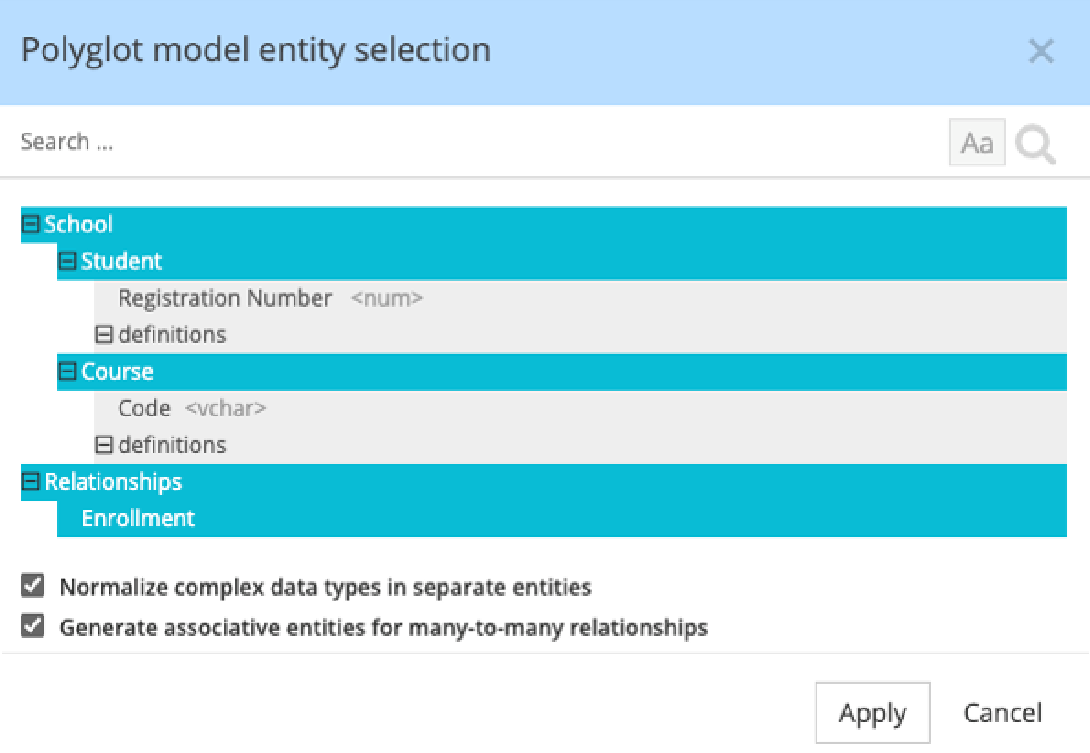
During derivation to a relational target, Hackolade Studio automatically generates an associative table to materialize this relationship, while preserving the cardinalities defined on the original many-to-many relationship. In this example, the associative table contains:
- A foreign key referencing the primary key of Student (Registration Number)
- A foreign key referencing the primary key of Course (Code)
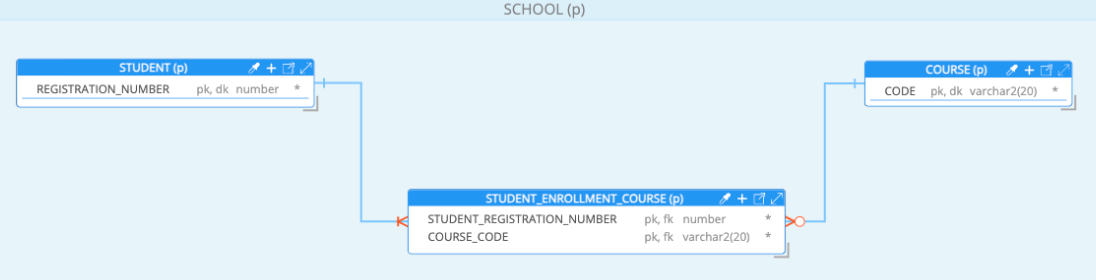
These foreign keys are derived directly from the primary keys defined on the related entities. When supported by the target database, they are also combined into a **composite primary key** on the associative table.
The original many-to-many relationship is replaced by two one-to-many relationships that reflect the original cardinalities:
- one from **Student** to the associative table, where participation is mandatory (a student must be linked to at least one course)
- one from **Course** to the associative table, where participation is optional (a course may exist without any enrolled students)
In this example, both entities define a single-column primary key. The same behavior applies when entities define composite primary keys: all primary key components are used to generate the foreign keys and, when supported, the composite primary key of the associative table.
How to use non-key attributes as PK in associative entities
In most cases, associative entities generated during derivation rely on the primary keys of the related entities. This follows standard relational modeling practices and is the recommended approach.
However, in some advanced scenarios, you may want the associative table to reference a different unique key instead of the primary key. Hackolade Studio allows this by explicitly defining the attributes to be used on the many-to-many relationship.
When does this approach make sense?
Using non-key attributes in an associative entity can be relevant when:
- the primary key is a technical or surrogate identifier (for example, a UUID)
- a business (natural) identifier exists and is enforced as unique
- downstream systems, integrations, or reports rely on business keys rather than technical identifiers
In all cases, the selected attributes must uniquely identify the related entity. Foreign keys can reference either a primary key or a unique constraint.
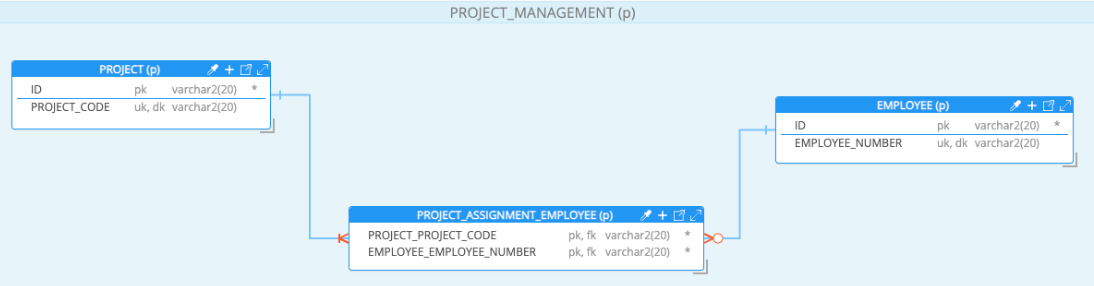
Example: Employee and Project
The following example illustrates a valid use case where the associative table does not rely on the primary keys of the related entities, but on alternative business identifiers.
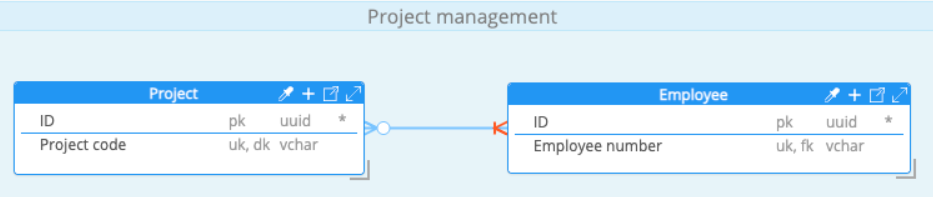
The Employee entity defines:
- a technical primary key: ID (for example, a UUID)
- a business identifier: Employee number, defined as unique
The Project entity defines:
- a technical primary key: ID (for example, a UUID)
- a business identifier: Project code, defined as unique
At the conceptual or logical level, employees and projects are linked by a many-to-many relationship (assignments).
On this relationship, the modeler explicitly selects:
- Employee number on the Employee side
- Project code on the Project side
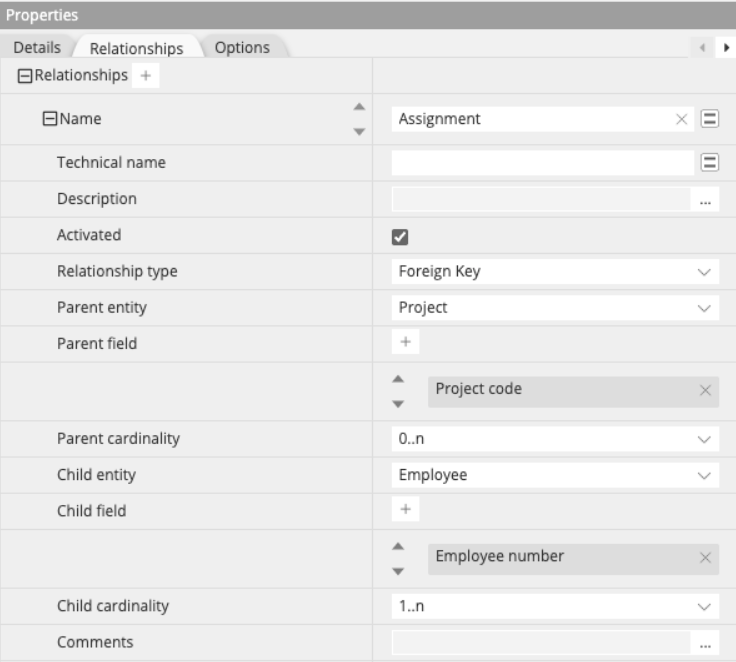
During the derive operation, Hackolade Studio:
- Uses the selected relationship attributes instead of the entity primary keys
- Generates foreign keys in the associative table based on Employee number and Project code
- Builds the composite primary key of the associative table from these foreign keys, when supported by the target
This results in an associative table that aligns with business identifiers commonly used in integrations, reporting, or data exchanges.
Important considerations
- The selected attributes must be unique on their respective entities
- This approach should be used only when there is a clear justification to prefer business identifiers over technical primary keys
- If no attributes are specified on the relationship, Studio falls back to using the entity primary keys
- If neither primary keys nor relationship attributes are available, Studio automatically generates identifiers to materialize the relationship