

Autonomous JSON database storage
Storage is one of the parameters in your monthly OCI invoice. To understand this aspect, we cover below
- how to monitor your storage utilization,
- how to get further details,
- and how to reclaim unused space.
Monitor storage utilization
To view the storage utilization for your instance, go to the OCI Console, open the menu > Oracle AI Database > Autonomous AI Database or https://cloud.oracle.com/db/adbs, then click on your database name to open its Details page, then go:
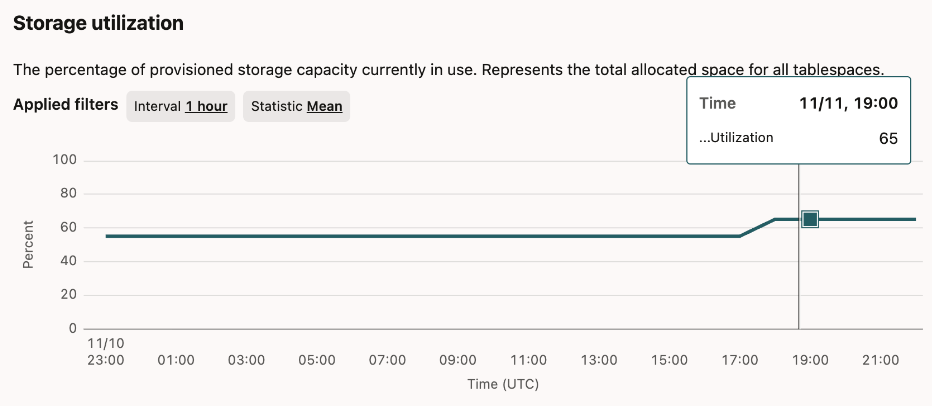
- either to the Monitoring tab (all the way to the right...) to view the Storage utilization graph
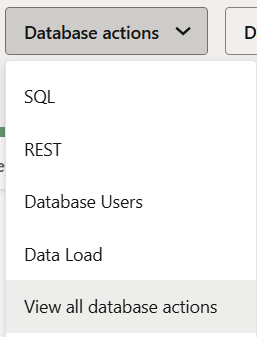
- or click on the Database actions button and choose the option "View all database actions"
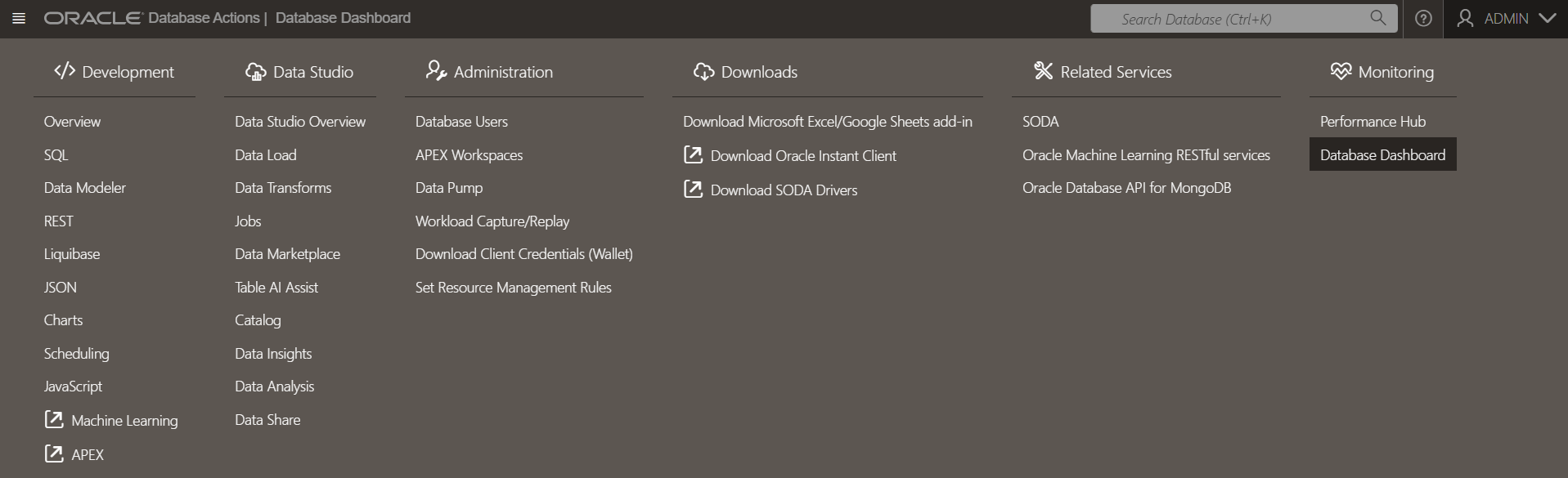
then in the menu, choose Monitoring > Database Dashboard:
and view this summary on the left hand side:
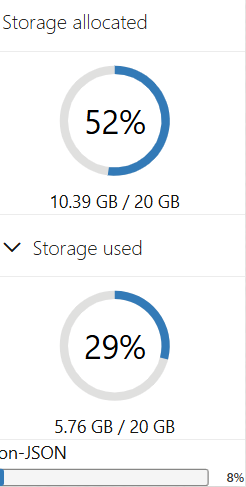
The above graph shows that 52% of storage is allocated. The storage actually used is 29% within this storage, and only 8% is allocated to the JSON data coming from your Git repositories (the small bar at the bottom of the graph).
In Oracle Cloud Infrastructure (OCI), the difference between storage allocated and storage used is as follows:
- Storage Allocated: amount of storage physically reserved or allocated for the database in all tablespaces (data and temporary), including the free space within those tablespaces. It represents the total storage capacity dedicated to the database, whether it is currently occupied with data or not. Allocated storage excludes storage for sample schemas.
- Storage Used: actual amount of storage actively used by database objects such as tables, indexes, and also includes any internally used temporary space within the tablespaces. It excludes the free space in the allocated tablespaces and also excludes the sample schema storage.
OCI supports auto scaling of storage, where maximum storage can be up to three times the base reserved storage, but allocated and used storage are the physical and actual consume metrics at any given time.
You are billed based on the total amount of storage capacity allocated or reserved for your database or storage service, including both the space that contains data and the free space reserved within that allocation. Even if not all the allocated storage is actively used by data, you pay for what has been provisioned.
This approach ensures capacity is available as needed, but it also means monitoring allocated storage is important for cost management, so you do not over-allocate storage and incur unnecessary charges.
Further details
Now, let's dig a bit deeper to understand how our data is stored. The queries below are mostly coming from this source.
Storage used
You can run the following query:
select owner, sum(bytes)/1024/1024/1024 as size_gb
from dba_segments
group by owner
order by size_gb desc;
Which will lead to a result not unlike this:
"OWNER" "SIZE_GB"
"SSB" 162.41888427734375
"HCK_HUB" 2.767822265625
"SYS" 1.6702880859375
"APEX_240200" 0.82513427734375
"OML$METADATA" 0.15924072265625
"ODI_REPO_USER" 0.142822265625
"MDSYS" 0.07470703125
"GRAPH$METADATA" 0.02197265625
"C##ADP$SERVICE" 0.0091552734375
"C##CLOUD$SERVICE" 0.009033203125
"ORDS_METADATA" 0.0069580078125
"SH" 0.005615234375
"AUDSYS" 0.00518798828125
"CTXSYS" 0.00494384765625
"DVSYS" 0.00445556640625
"RMAN$CATALOG" 0.0020751953125
"GSMADMIN_INTERNAL" 0.0010986328125
"XDB" 0.00091552734375
"ADMIN" 0.00079345703125
"VECSYS" 0.00054931640625
"SYSTEM" 0.0003662109375
"LBACSYS" 0.00030517578125
"OML$MODELS" 0.0001220703125
The SSB and SH schema are sample schemas, and its storage isn't counted toward the storage billed.
To calculate your actual storage uses, simply sum the bytes used in the segments (except for the SSB and SH sample schemas)
select sum(bytes)/1024/1024/1024 as USED_TOTAL_GB
from dba_segments
where owner not in ('SSB', 'SH');
In our example above, the user schema for the Model Hub is HCK_HUB and it show a manageable size of less than 3GB for the 1500 or so models in our various Git repositories. This storage used will grow with the number of synchronized models.
Storage allocated
Allocated storage is important because it is the actual disk space reserved on the disk used by OCI to bill for the database instance.
This query
with cte as
(
select 'data_files' as type, sum(bytes)/1024/1024/1024 as size_gb from dba_data_files where tablespace_name != 'SAMPLESCHEMA'
union all
select 'temp_files' as type, sum(bytes)/1024/1024/1024 as size_gb from dba_temp_files
)
select * from cte;
gives us our allocated space:
"TYPE" "SIZE_GB"
"data_files" 10.220703125
"temp_files" 2.064453125
"total" 12.285
The data files are where the bulk of the data is stored, which is normal since they contain actual data, while the temp files are temporary files used by the database for operations like sorting data.
Reclaim unused space
Storage management is handled automatically by the database. Normally, you should not have to care about clean up tasks, especially when using the Autonomous AI Database.
However, if you just inserted a huge amount of data for a test in a non-production environment, then want to free up space yourself, it is still possible by resizing the data files. To reduce the storage allocated, you may reclaim some free space by following these instructions.