

Generate foreign keys for conceptual relationships when deriving from Polyglot
Note
Starting with Hackolade Studio v8.13.7, with the plugin of the target released on the same date. Make sure to update the plugin of your target together with Hackolade Studio.
In a Polyglot model, you can link two entities with a relationship at the entity level, before you decide which attributes carry the foreign key. This is typical at the conceptual level: you know that a Customer places Orders, but you have not created any customer attribute in the Order entity yet. We call this a conceptual relationship.
When you derive such a model to a relational target, Hackolade Studio can create the missing Foreign Key column for you in the child table, plus the Foreign Key relationship to the parent Primary Key. It works in the same spirit as the associative tables for many-to-many relationships: you model the business meaning in Polyglot, and the derivation produces the physical structure.
Foreign key attributes and destination key attributes
This feature allows you to skip having to explicitly specify in the Polyglot model all the parameters of a Foreign Key constraint, including the attributes on both sides.
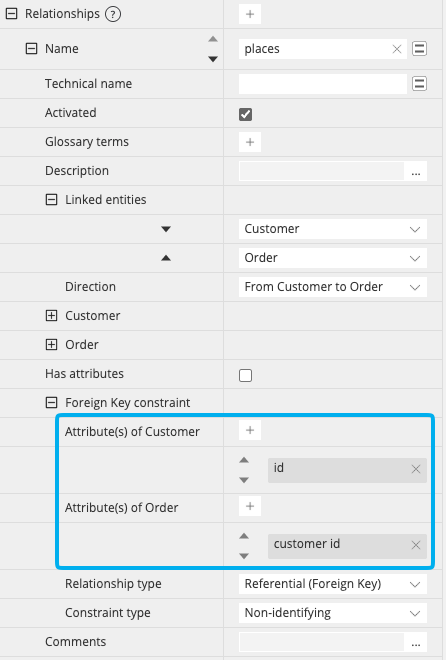
If you were to do it manually in the Polyglot model, you would set the attributes of a relationship in the Foreign Key constraint section of its Properties pane. This section shows one property per linked entity, named after the entity: Attribute(s) of Customer and Attribute(s) of Order in our example. When the foreign key is defined, the attributes on each side of the FK relationship can be set:
Throughout these pages, we use two terms for these attributes:
- foreign key attributes: the attributes of the child entity that form the foreign key constraint, here the
customer idattribute in the Order entity. They are marked fk in the ER diagram. - destination key attributes: the attributes of the parent entity that the foreign key points to, here the
idattribute in the Customer entity. They are marked dk in the ER diagram.
We also call the child entity the entity that holds the foreign key attributes, and the other one the parent entity. The Properties Pane of a relationship in a Polyglot model does not use these two names, but the Properties pane of a relationship in a physical model does.
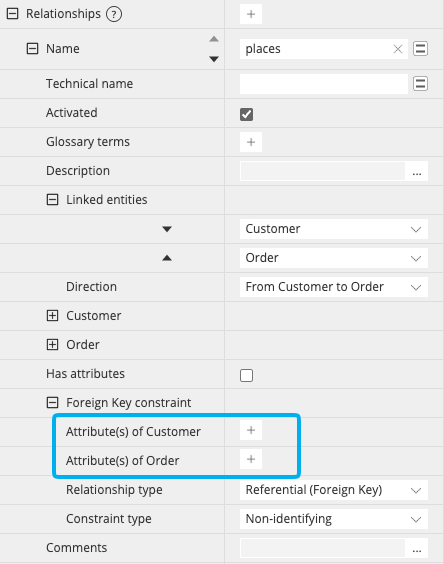
A conceptual relationship is a relationship where both properties of the Foreign Key constraint section are empty, or where only the destination key attributes are set. This is what the derivation completes.
Note
These attributes are not the attributes carried by the relationship itself, when Has attributes is enabled (for example a quantity between Order and Product). A relationship that carries attributes always becomes an associative entity, as described in Associative entity: add attributes to a relationship.
Enable the option in the derive dialog
The generation is controlled by the option Generate foreign keys for conceptual relationships, in the Derivation options of the derive dialog, just under Generate associative entities for many-to-many relationships:
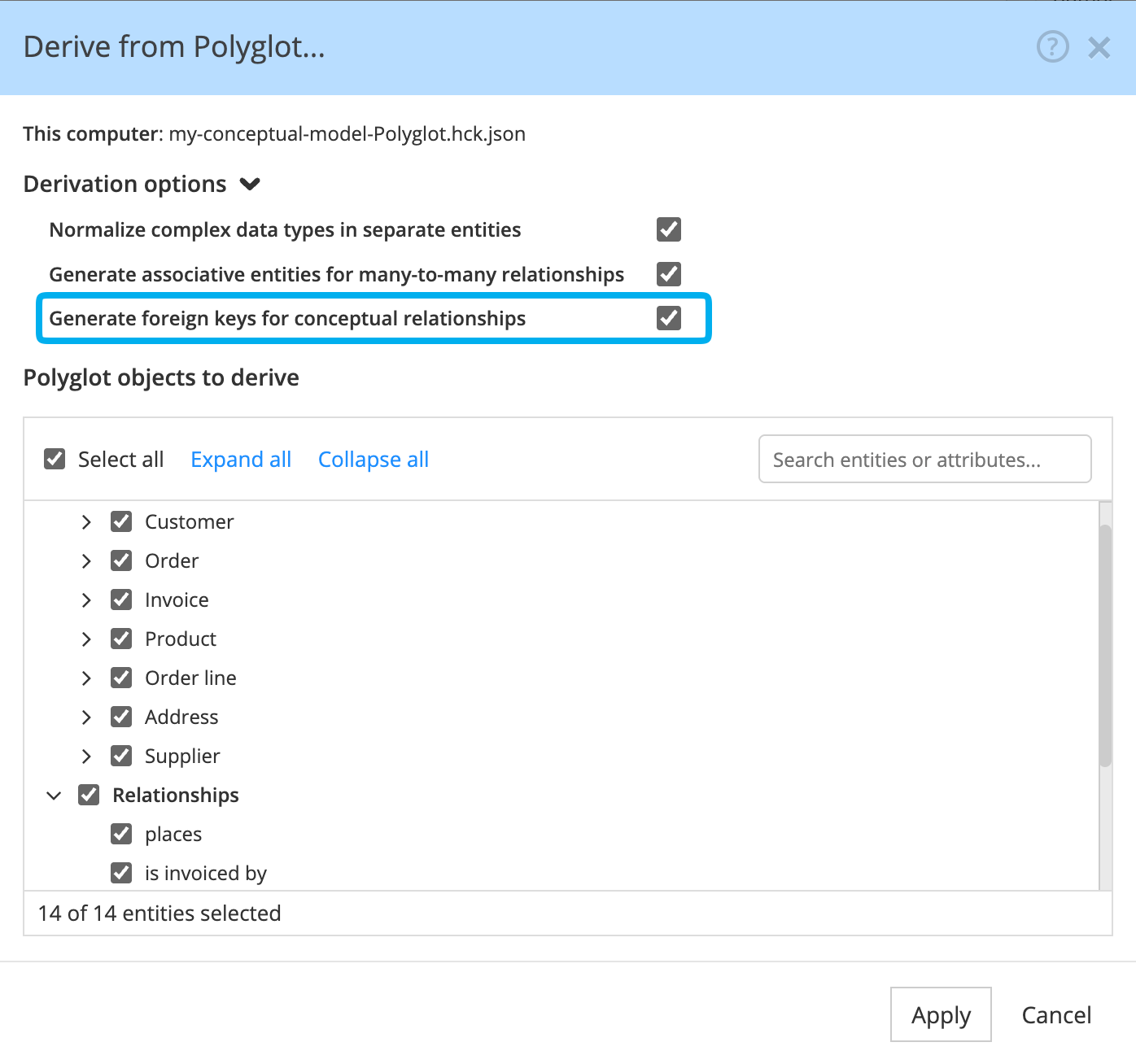
The option is enabled by default.
Note
The option applies to the whole derived model, not per relationship: it is not possible to generate foreign keys for some conceptual relationships and not for others in the same derived model.
The option is displayed only for the targets where a foreign key is the expected result:
- BigQuery, CockroachDB, Db2, Db2 for z/OS, Delta Lake/Databricks, Hive, MySQL, Oracle, PostgreSQL, Redshift, Snowflake, SQL Server/AzureSQL, Synapse, and YugabyteDB,
- Polyglot, when you derive a conceptual Polyglot model into a more detailed logical Polyglot model.
For graph targets, and for targets that support both foreign keys and edges, a conceptual relationship is derived as an edge. For document databases, it is derived as it is, without foreign key attributes.
Note
The same choice is available for the polyglotDerive command of the Command Line Interface.
Relationships concerned
Hackolade Studio generates foreign keys for the relationships of the Polyglot model that meet all these conditions:
- no foreign key attributes are selected in the Foreign Key constraint section; the destination key attributes can be selected or left empty,
- Relationship type is set to Foreign Key or left empty: a Foreign Master relationship is derived as it is,
- Has attributes is not enabled: a relationship that carries attributes becomes an associative entity, as described in Associative entities for many-to-many relationships,
- both cardinalities are defined, and the relationship is one-to-one or one-to-many. A many-to-many relationship also becomes an associative entity.
All other relationships are derived as they are, without generated foreign key attributes. Check and update generated foreign keys describes the warnings that list them after derivation.
Important
Both cardinalities are needed. With only a 1 on one side, the relationship could be one-to-one or one-to-many, which changes the unique key and sometimes the child entity. With only a 0..n, it could be one-to-many or many-to-many, which leads either to a foreign key or to an associative table. Without both cardinalities, no foreign key attributes are generated.
Examples, from the simplest case to the most complex
The following pages build one example step by step, from a Customer and its Orders to a complete order model:
- Derive a one-to-many conceptual relationship: the most common case, the names of the generated attributes, and the entity where they are created.
- Derive a one-to-one conceptual relationship: the unique key, and the entity where the foreign key is created when both cardinalities are the same.
- Derive identifying conceptual relationships: foreign key attributes added to the primary key, and chains of identifying relationships.
- Point a foreign key to a unique key instead of the primary key: point to a business identifier, a composite primary key, or a parent entity without primary key.
- Several conceptual relationships to the same entity: the names of the generated attributes when they would conflict.
- Check and update generated foreign keys: the warnings after derivation, the derivation of part of the model, and the updates of the derived model.