

AI-assisted data modeling
Note
AI-Assisted Data modeling features are available only in the Ultimate and in the 14-day free trial editions. They currently work in only the desktop application, and with Polyglot models
Warning
Results may differ depending on many factors, including provider, model, version, effort, etc. In particular, users wanting more realistic results should provide sufficient details and context in their prompts.
AI does make mistakes, and even the best AI requires a review by a good data modeler. Input and feedback from and reviews by subject matter experts are irreplaceable.
Most vendors these days claim to have integrated "AI features". But not all integrations are equal... We encourage evaluators to compare offerings side-by-side.
Important
Aside from the import of GenAI-created artifacts such as xDBML, DBML or Mermaid, which are available in Pro and Workgroup editions, integrated AI features are available only in the Ultimate Edition.
Note
To serve different use cases, an MCP server is shipped with Model Hub.
Philosophy
Our approach to AI integration is built on customer control, confidentiality, and responsible use. AI capabilities remain inactive until you configure a connection to the AI provider of your choice, with your own credentials. The AI features must be specifically invoked. Customers remain free to select the LLM, model, or provider that best meets their security, regulatory, and operational requirements, including self-hosted or on-premises models where appropriate.
This approach helps protect your sensitive metadata, schemas, and data models from unintended exposure, third-party retention, or unauthorized use for model training.
We also believe that human oversight must be meaningful: AI should support expert judgment, not replace it with superficial approval of algorithmic outputs under pressure.
The background of this approach is described in Data modeling and the AI lifecycle.
AI on your own terms
When comparing solutions, it is important to understand: where are your prompts, your data models, your schemas, and your metadata actually disclosed?
The solution architecture is a critical aspect in the sovereignty of your information to avoid data leakage.
The competition records all your AI prompts and responses
With well known legacy tools, the application (whether a client tool via a proprietary server, or the server of a SaaS solution) calls the vendor's own AI service, which relays the call to a single vendor-selected LLM. The vendor stores a log of user ids, prompts, and responses on its own servers. Your models and metadata are shared, if not stored with the vendor, with all the risks that this may represent.

Hackolade lets you use AI on your own terms
The Hackolade solution architecture supports your AI Governance. By AI Governance, we primarily mean capabilities such as bring-your-own key (BYOK), support for local LLMs, model selection, usage policies, and analytics (consumption and ROI) for AI features in the product.
In all cases, nothing goes through Hackolade infrastructure. Your environment calls the AI model directly, with your own credentials, under your own contract.
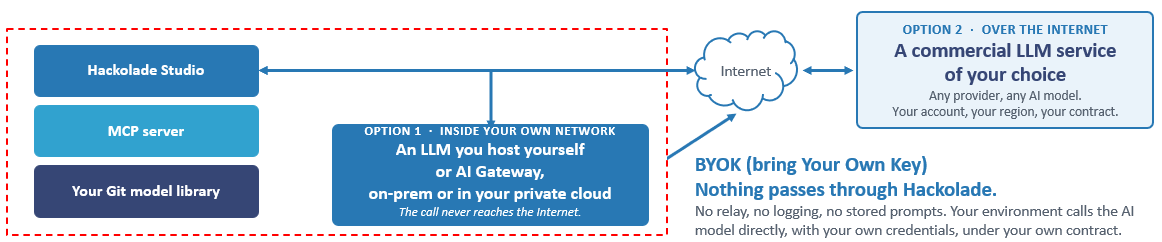
You may connect to local LLMs, AI gateways, or directly to the online provider of your choice.
Getting started
- Configure a connection to your AI provider, with your own API key.
- Open a Polyglot model, or create a new one.
- Ask your questions and give your instructions in the AI chat panel, or right-click a model object and choose Assist me to work on that object only.
Every change made through the AI chat panel can be reviewed in the ERD and the Properties pane, and undone like any other change.
Use cases
The examples below show what you can do with the AI chat panel and Assist me. Example prompts are in italics.
Create and change data models
From a description. Starting from an empty Polyglot model, describe your domain in plain language. The AI chat panel creates the entities and relationships at the level of detail you ask for: a conceptual model, or a logical model with attributes, data types, primary and unique keys, and cardinality. You can also ask it to normalize the structure. The richer your prompt and the more context you provide, the more accurate results will be. Note that results may vary depending on the provider and AI model you choose.
Physical model and DDL. Once the logical model is in place, derive the physical model for your target and generate the DDL in its native dialect. The same Polyglot model can be derived into several targets. Soon, it will also be possible to access the AI chat panel from physical model targets.
Changes in batch. One prompt applies the same change to many objects, for example Add the attribute created_at, of type timestamp, to every entity that has an attribute updated_at.
Renaming. Ask the AI chat panel to rename containers, entities, attributes, keys, relationships or views. When naming conventions are coupled, technical names follow the new business names.
Attributes and data types. Ask to add, modify or remove attributes and to change their data types, in one entity or in several at once.
Structural changes. Ask for changes that combine several operations, for example splitting an entity in two, or creating an associative entity for a many-to-many relationship.
Review before you commit. The AI chat panel applies its changes to the model open in memory and explains them in the chat. Review them in the ER diagram and the Properties pane, and undo them in one step with Ctrl+Z if needed. The changes reach the data model in your Git repository only after you save and commit them and the pull request is approved. Reviewers see a model-aware comparison of all the changes when they review the change request.
Migration scripts. ALTER scripts need no AI: compare two versions of a model and generate the delta model and ALTER script.
Enrich metadata
Descriptions. Right-click a container, entity, view or attribute and choose Assist me to get a description written from the content of the model. Edit the proposed text if needed, then apply it. To describe many objects at once, ask in the AI chat panel, for example Write a business description for every entity of the container Logistics. Descriptions can be written in any language that your AI model supports.
Batch enrichment. One request can combine several operations across many objects, for example Add a description and a sensitivity classification to every attribute of the entity Customer. All the changes from one request form a single undo step.
Missing attributes. Ask the AI chat panel to review an entity against the practice of your domain or industry, for example Review the entity Shipment for a pipeline operator and list the attributes that are missing. Confirm the attributes you want, and the AI adds them in a single step.
Relationships that are not declared. Models reverse-engineered from databases without declared constraints often lack foreign keys. Ask the AI chat panel to identify and create them, or use Infer PKs & FKs in the Tools menu, which proposes candidate keys from the names and data types of entities and attributes.
Sensitive data. Ask the AI chat panel to identify the attributes likely to hold personal, health or financial data. Record the classification in a user-defined custom property, for example a sensitivity list with the categories of GDPR or PII. The classification then appears in the generated documentation and in Excel exports, and is published with the data model to Collibra and DataHub.
Ask questions about your data model
Summaries and reports. Ask for an executive summary of the model, a list or a report, for example Summarize the structure and main subject areas of this model for an executive audience, then copy the answer into your own document. For formatted documentation of the model, use Generate Documentation.
About the whole model. Questions can cover all the containers of the open model, for example Which entities have no primary key?
About an object. Leverage the @mention functionality in the chat by typing @ followed by the name of a table, column or view to reference it in your question. Click an object name in an answer to open the object in the model. To ask about one object only in the ERD or the Object Browser, right-click it and choose Assist me.
For a given audience. Say who the answer is for, for example a business-level explanation for a data steward, or a technical one for a developer.
Impact of a change. Ask which entities and relationships depend on an attribute before you change it, for example What is affected if I change the data type of the attribute pipeline_id? For impact across data models, use the impact analysis of Polyglot derivation, the Where-Used dialog of reusable definitions, and the Where-Used tab of Model Hub.
Semantic artifacts. Ask the AI chat panel to generate RDFS, OWL and SHACL in Turtle syntax from the model. The output is limited to what the ER diagram expresses.
Chat history. The AI chat panel saves your chat history on disk.
Apply your standards
Naming conventions. Hackolade Studio applies the naming conventions of the target to the objects that the AI creates, as to any other object, when coupling is enabled for all objects. You can also state your standards in the prompt.
Verification. Run Verify Data Model on the result to check it against your glossary, your attribute property rules and your regular-expression rules. To correct the violations listed in the report, re-apply the naming conventions, or ask the AI chat panel to rename the objects concerned.
Architectural style. Polyglot models, reusable definitions, snippets, custom properties, naming conventions and verification rules, shared through Git, carry your organization's patterns into every model. With the MCP server of Model Hub, your AI assistant reads your library of data models, and you adjust its instructions, skills and tools so that it follows your patterns.
Work across data models with Model Hub
The MCP server of Model Hub connects your AI assistant, such as Microsoft 365 Copilot through Copilot Studio, VS Code Copilot, Claude or Cursor, to the library of data models in Model Hub. Use it to list data models, explain them, answer impact questions across models and repositories, or generate SQL queries from them.