

Derive a one-to-many conceptual relationship
This page starts the example used in all the pages of this section Generate foreign keys for conceptual relationships when deriving from Polyglot, with the most common case.
Example: Customer places Order
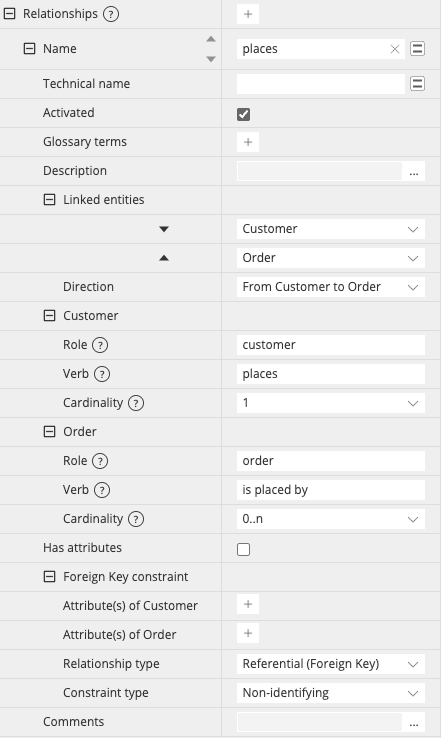
In the Polyglot model, Customer and Order are linked by a relationship "places", with an empty Foreign Key constraint section. Each order belongs to exactly one customer (cardinality 1 on the Customer side), and a customer can place any number of orders (cardinality 0..n on the Order side). The primary key of Customer is id, an integer with auto-increment:

The cardinalities are set for each linked entity in the Properties Pane of the relationship, while the Foreign Key constraint section stays empty:
When you derive this Polyglot model into a PostgreSQL data model with the option checked, Hackolade Studio adds the foreign key column Customer_id to the Order table, and turns the relationship into a regular Foreign Key relationship from Order.Customer_id to the destination key column Customer.id:
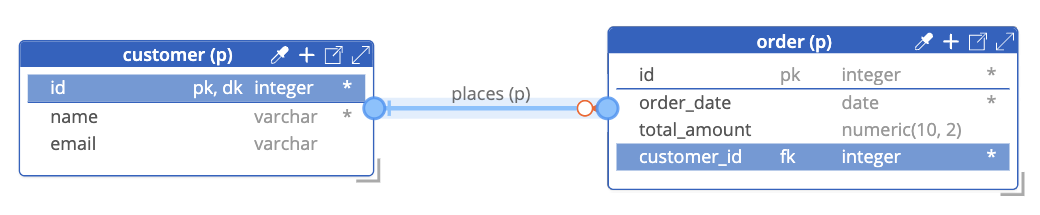
With the naming conventions of the PostgreSQL model, Customer_id becomes customer_id.
The generated foreign key column takes over the characteristics of the destination key column in the parent entity:
- data type, length, precision and scale, since a foreign key constraint is only valid between attributes of the same type,
- other properties of the destination key column.
It does not take over the following properties:
- primary key and unique constraints, since the same customer appears in many orders,
- auto-increment and default value: an auto-increment on
Customer_idwould produce incoherent values, and targets such as SQL Server or MySQL reject a table with two auto-increment columns, - required, which is set from the cardinality instead: here, an order always has a customer, so the
Customer_idcolumn is required.
Names of the generated attributes
The name of a foreign key attribute is built as {parent entity name}_{destination key attribute name}, so Customer_id in our example. Its technical name follows the same pattern with the technical names, if naming conventions are enabled for the target.
With this pattern, there is no conflict in the usual case where both entities have an id attribute: the Order table keeps its own id and the column Customer_id is added. For the cases where two generated attributes would have the same name, see Several conceptual relationships to the same entity.
The cardinality determines the entity with the foreign key
Hackolade Studio reads the cardinalities to find the child entity, not the order in which you selected the entities when you created the relationship. In a one-to-many relationship, the foreign key attributes are always created in the entity on the "many" side (cardinality 0..n or 1..n). If you created the relationship by selecting Order first and Customer second, the result remains the same: the Customer_id column is added to the Order table.
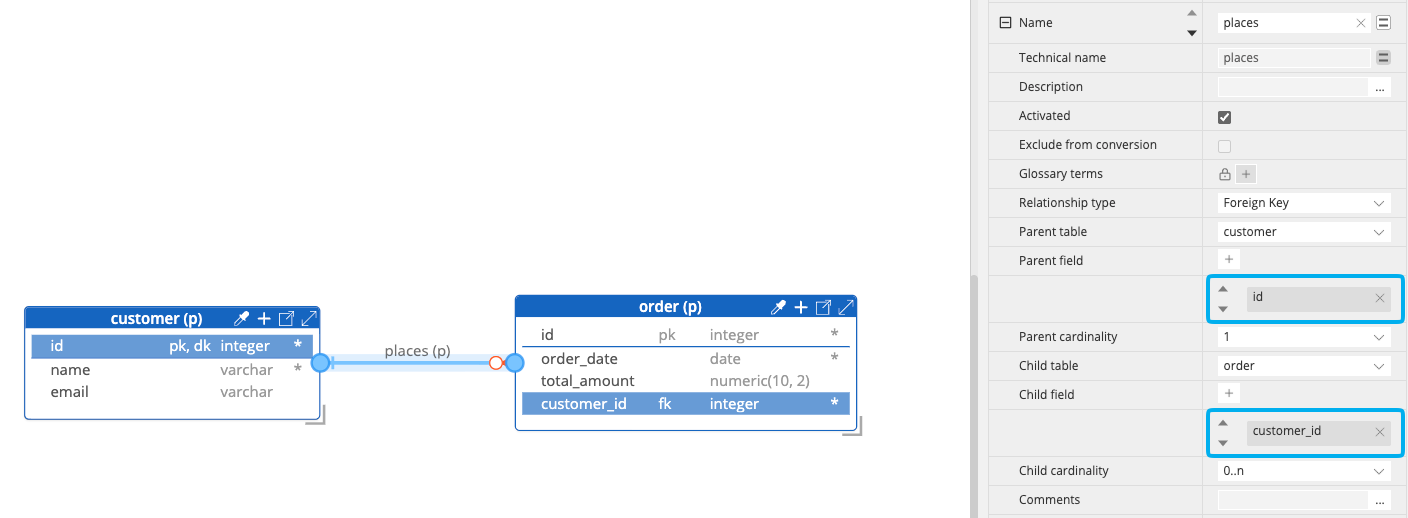
Whatever the order of the linked entities in Polyglot, the Properties pane of the relationship in the derived model shows the parent entity as Parent table and the child entity as Child table, with the destination key attribute as Parent field and the foreign key attribute as Child field:
Note
The source Polyglot model keeps the order in which you linked the entities.
When the foreign key is optional
If the system you model accepted guest orders, an order would have zero or one customer, with cardinality 0..1 on the Customer side. The Customer_id column would still be added to the Order table, but it would not be required.
Note
Only the cardinality is used for this: the Required property of Customer.id has no effect on the Customer_id column.