

Check and update generated foreign keys
This page completes Generate foreign keys for conceptual relationships when deriving from Polyglot: what Hackolade Studio reports after derivation, what it generates when you derive only part of the Polyglot model, and how the generated foreign keys follow the Polyglot model.
Warnings after derivation
When a relationship is not generated, or is generated differently from what the Polyglot model says, Hackolade Studio reports a warning with the list of the relationships concerned:
- a cardinality is missing: foreign key attributes are not generated,
- foreign key attributes are selected but destination key attributes are empty: nothing is generated,
- an identifying relationship cannot be applied (cardinality 0..1 on the parent side, or a cycle): it is generated as non-identifying,
- foreign key attributes and destination key attributes are both selected, but not in the same number: the relationship is derived as it is, nothing is corrected.
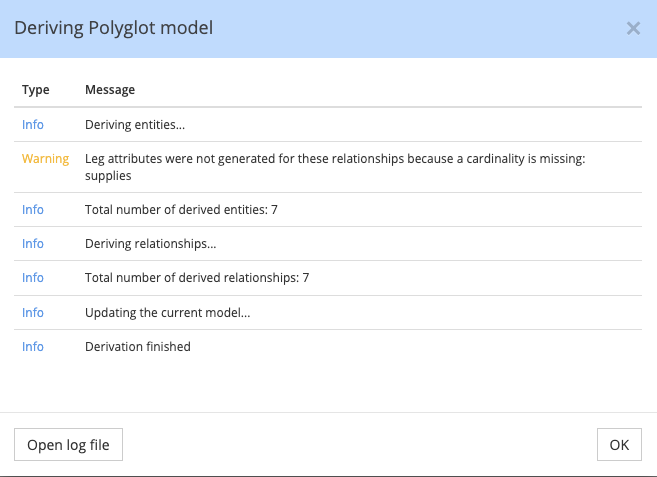
In the following example, the relationship supplies has no cardinality on one side, so no foreign key attributes are generated for it:
Note
These warnings are not raised when the option is unchecked, since you did not ask for the generation.
Important
A relationship created from the Properties pane or from the Graph View has no cardinality until you set it. In a conceptual model, the first derivation with the option can therefore list many relationships. Set their cardinalities in Polyglot, then derive again.
When you derive only part of the Polyglot model
When you derive from Polyglot, you can select only some entities and relationships in Polyglot objects to derive. A relationship is derived only when it is selected together with both linked entities. The foreign key attributes are different: Hackolade Studio generates them as soon as the child entity is selected, even when the parent entity and the relationship are not.
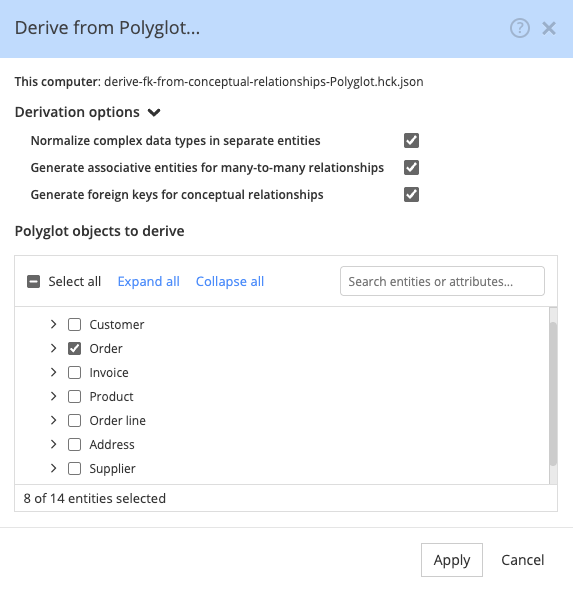
Let's derive the Order entity alone, without the Customer and Address entities:
The derived model contains the Order table with its foreign key columns: customer_id, from the first example, and billing_address_id and delivery_address_id, from Several conceptual relationships to the same entity. It contains no Customer or Address table, and no Foreign Key relationship:
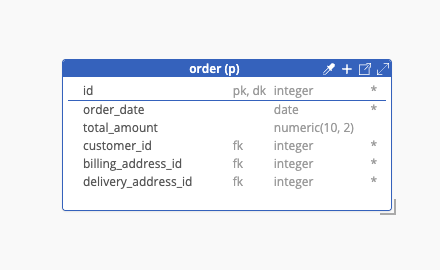
The result is the same as if you had selected these attributes yourself in the Foreign Key constraint section of each relationship in Polyglot. The foreign key attributes belong to the structure of the Order entity, so they are derived with it. Only the relationships and the other entities are left out of the derived model.
Note
The same happens when the parent entity or the relationship is marked Polyglot only: it is not derived, but the foreign key attributes are still added to the child entity, as soon as it is derived.
Tip
If you do not want these attributes in the derived model, delete them by hand after derivation.
Updates of the derived model
You choose the option once, when you derive. Its value is stored in the derived model, and Hackolade Studio applies it again each time you update the derived model from the Polyglot model. The generated attributes therefore follow the Polyglot model:
- if the primary key of a parent entity changes in Polyglot, the foreign key attributes are adjusted at the next update,
- if you select foreign key attributes later in Polyglot, the relationship is derived as it is at the next update, and the attributes generated before are not produced anymore.
Note
If your derived model was created without this option in the derive dialog, the option is considered unchecked, and an update does not change the model. Derive the model again to get the generated foreign keys.
The source Polyglot model is never modified: the Foreign Key constraint section of its relationships stays empty. When the target is Polyglot, the derived Polyglot model contains regular Foreign Key relationships, with both properties of the Foreign Key constraint section filled in, so a further derivation from it derives them as they are.
When the foreign key attribute already exists
The generation never reuses an existing attribute of the child entity, even when its name or data type matches. If the Order entity already contains an attribute customer_ref that holds the customer identifier, Hackolade Studio still creates the Customer_id attribute next to it.
Tip
To use an existing attribute as foreign key attribute, select it yourself in Attribute(s) of Order in the Polyglot model, and the destination key attribute in Attribute(s) of Customer. The relationship is then derived as it is, with your attributes.