

Build a Polyglot chain from an existing database
The previous scenarios cover a single level of derivation: one Polyglot model, and a physical model derived from it. Hackolade Studio also lets you derive a Polyglot model from another Polyglot model, with no limit on the number of levels. Polyglot models derived from each other form a Polyglot chain, with the physical model at the end.
Often when starting from a blank sheet, data modelers will first create a conceptual model, then enrich it to become a logical model -- both technology-agnostic -- before creating one or more physical models. This is done using three levels: a conceptual Polyglot model, a logical Polyglot model derived from it, and a physical model derived from the logical one.
This page covers a different use case where the starting point is a database instance, the only source of truth, with no model in Hackolade Studio yet.
Note: Before you go further, make sure that you really need a conceptual Polyglot model separate from the logical one. In most cases, a single Polyglot model is enough: its graph view gives a conceptual view of the model, and its ER diagram holds the logical structures, as explained in Polyglot Data Modeling. In such case, this page does not apply: it should be enough to reverse-engineer the database into a physical model, then convert it into a Polyglot model and make the physical model dependent on it, as described in the Polyglot Data Model page. This way there is only one Polyglot model for both conceptual and logical purposes.
At this time, Hackolade Studio cannot directly convert a Polyglot model into another Polyglot model. As result, you cannot build in, one step, a chain upward from the physical model. When you want a chain and start from a database, you need to combine a top down with a bottom up approach.
At a high level, the database first feeds the root of the chain (the conceptual model), then you derive each level from the one above, and you finally bring the physical details back into the physical model:
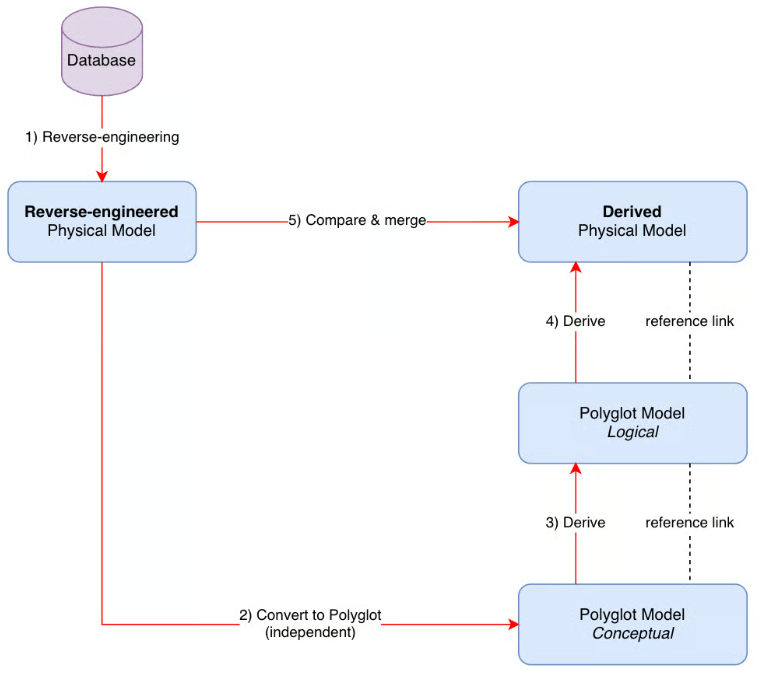
Let's see this process in detail...
Step 1: reverse-engineer the database into a physical model
Create a new model for the target of your database, then reverse-engineer the database, either from a DDL script or by connecting to the instance. The Reverse-engineering section details both options.
The reverse-engineered physical model contains the entire database structures, including the physical-only details. It is a temporary model: you use it at step 2 and at step 5, and you can discard it at the end.
Step 2: convert the reverse-engineered model into the conceptual Polyglot model
Note: if some objects of the reverse-engineered model do not belong in the Polyglot models, enable the Exclude from polyglot convert property on them before you convert. Hackolade Studio does not convert them, and they come back into the physical model at step 5, as detailed in that step. For views, this property is enabled by default; disable it on the views that you want in the Polyglot models.
From the reverse-engineered physical model, select Tools > Polyglot > Convert to Polyglot Model.... In the dialog, choose to keep the two models independent.
The two models stay independent, because you use the reverse-engineered model only to feed the root of the chain. The new Polyglot model is this root: your conceptual Polyglot model, initialized with everything the database contains.
Even without the physical-only objects, this conceptual model may still hold more detail than you want at the conceptual level. You will refine this later, once the whole chain is built.
Step 3: derive the logical Polyglot model from the conceptual Polyglot model
Create a new Polyglot model, then select Tools > Polyglot > Derive from Polyglot Model and choose the conceptual Polyglot model. Keep all objects selected in the selection dialog. The result is your logical Polyglot model, derived from the conceptual one.
At this stage, both Polyglot models have the same content, since one is derived from the other. This is expected: the refinement between conceptual and logical comes later.
Step 4: derive a new physical model from the logical Polyglot model
Create a new model for the same target as the reverse-engineered model, then derive it from the logical Polyglot model with Tools > Polyglot > Derive from Polyglot Model.
This new physical model is derived from the logical Polyglot model, itself derived from the conceptual one. The chain of three models now exists.
Step 5: compare and merge both physical models
The newly derived physical model at step 4 comes from the Polyglot models, so it lacks the purely physical details, such as indexes or the objects excluded from conversion. In this step, you take these details back from the reverse-engineered model at step 1.
Select Tools > Compare and Merge Models, then place the two models as follows:
- on the left, the reverse-engineered physical model;
- on the right, the newly derived physical model.
Important: keep the newly derived model on the right side. The merged model inherits its derivation links from the model on the right.
The two models do not share internal IDs, since they come from two different operations. In the matching criteria, select Business names; then switch to the merge view:
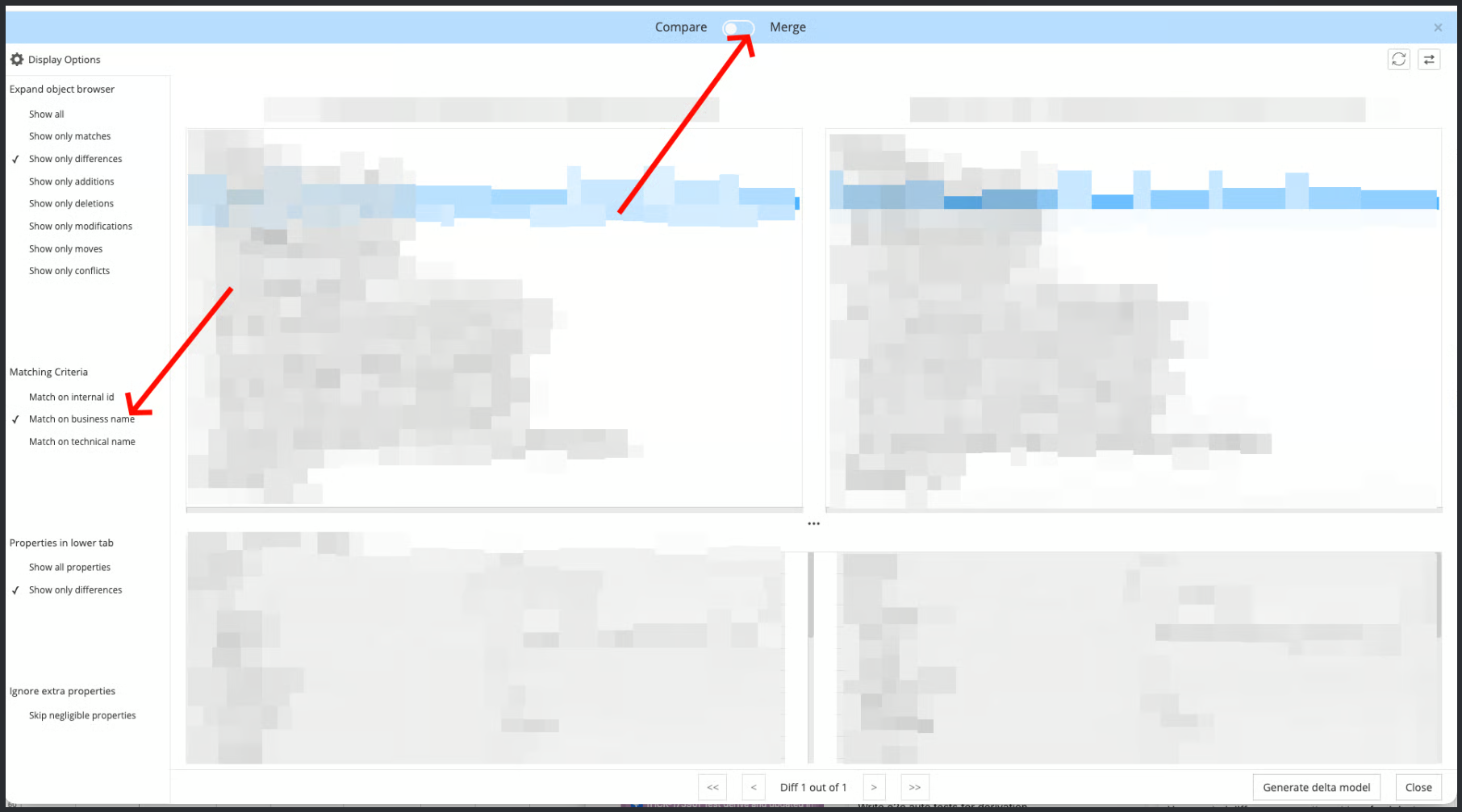
This merge is a particular case, because the right-hand model comes from the left-hand one through the chain of Polyglot models. You should only find details lost along the chain, such as indexes or the objects excluded from conversion, and no modified values. The merged model that Hackolade Studio proposes by default is therefore enough: it completes the newly derived model with these physical details. The Compare and merge models page explains the merge view, if you want to review the differences one by one.
In the diagram below, the extra table exists only in the reverse-engineered model. The merged model keeps it as a physical-only table, and keeps the reference link of the other table to the logical Polyglot model:
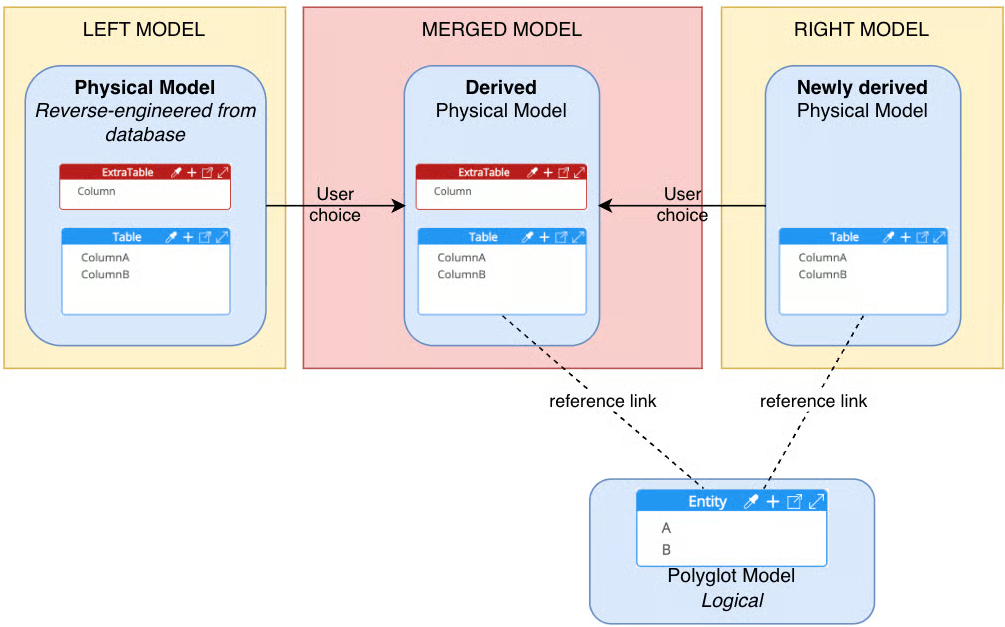
Save the merged model. This is the final physical model: derived from the logical Polyglot model, and aligned with the database. You can now discard the reverse-engineered model at step 1 and the newly derived model at step 4.
Refine the conceptual model
The conceptual Polyglot model now contains everything converted from the database. Refine it: remove what belongs to the logical level only, for example identifiers, or foreign keys, so that relationships stay conceptual relationships.
Then update the definitions of the logical Polyglot model, which depends on the conceptual one. The impact analysis window lists the changes made in the conceptual model. Do not accept the deletions that concern the conceptual level only: the logical model keeps these objects, as deviations. The Polyglot Data Model page explains the impact analysis window and deviations, and Polyglot Data Modeling describes the update of derived models.
Keep the chain aligned with the database
The database keeps evolving after you build the chain. To bring later changes into the physical model, follow Compare a baseline model with schema in prod: the physical model stays derived from the logical Polyglot model, and the changes become deviations in it.