

Customize forward-engineering scripts
An artifact, such as a DDL or a schema script, generated from your data model, is rarely the last step. A DBA, a DevOps engineer, or a deployment pipeline may be running that script, and each team often has its own rules about the script content or structure. When the generated script does not follow these specific rules, someone must edit it by hand each time the script is generated. These edits take time, they are easy to forget, and the deployed database slowly drifts away from what you modeled.
Hackolade Studio lets you set these rules once, in three ways:
- the script generation parameters, to change how a statement is written,
- the custom script hooks, to add your own statements before or after the generated ones,
- or a custom script format, to write a complete script of your own.
Start with the simplest one that does the job.
What the script contains comes from your data model: its entities, attributes, and relationships, with the technical names set by your naming conventions, plus indexes and other target-specific statements. This page covers what you can change in the script itself.
Script generation parameters
Let's take a Customer table and an Order table, linked by a relationship on the customer_id column. Your data warehouse team loads the data in bulk and does not want foreign key constraints in the database, because they slow down processing. You still want the relationship in your data model: it documents how the tables relate, and it appears in your diagrams and documentation.
In the script generation parameters, set Foreign Keys to Ignore. Hackolade Studio keeps the relationship in the data model, and leaves the foreign key constraint out of the DDL. With In separate statement, it writes the constraint in a separate ALTER TABLE statement, later in the script instead.
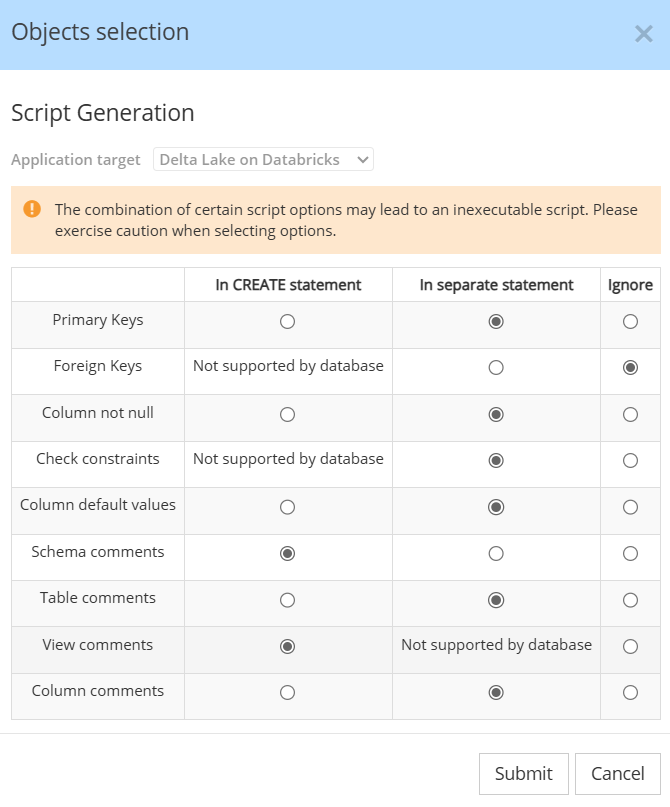
The same grid sets the primary keys, unique keys, not null constraints, check constraints, default values and comments. The script generation parameters are available for the DDL of SQL and SQL-like targets.
Note
Script generation parameters are set per target, i.e. they apply to all data models of that target, according to the settings on the Hackolade Studio instance running the forward-engineering operation. They are not stored in the data model file.
Custom script hooks
For example, your security team wants the reporting role to read every table, so each CREATE TABLE statement must be followed by a GRANT statement. Instead of adding these lines after each export, you write one statement at the level of the data model, after each CREATE TABLE statement:
GRANT SELECT ON ${schemaName}.${tableName} TO reporting_role;
Hackolade Studio replaces ${schemaName} and ${tableName} with the names of each table, so the script contains one GRANT statement for the Customer table and one for the Order table. When you add a table to the data model, its GRANT statement is in the next script.
Custom script hooks are available for the DDL of SQL and SQL-like targets. They also add comments, logging calls, or a header at the top of the script. You can insert custom content at predefined positions, hook points, in a DDL script: before and/or after: all statements, each or a specific CREATE SCHEMA, each or a specific CREATE TABLE, each or a specific view.
Note
Custom script hooks defined in a data model are stored in the data model file, and apply only to that data model. To apply a hook to all the data models of a target, select a file for its hook point in Tools > Options > Forward-Engineering > Script Generation (desktop application only), as described in the Options dialog.
Warning
Hackolade Studio inserts the statements of a hook as you write them, and does not check them. A wrong or useless statement can break the script, or change the database in a way you did not expect. Test the generated script before you run it on a production environment.
Custom script formats
Let's say that your team needs to deploy the same data model to multiple environments: a development, a test, and a production environment, through a CI/CD pipeline. The pipeline generally needs more than just a list of schema statements. It needs a script that takes the environment as a parameter, and runs some steps only in, for example, your production environment. Script generation parameters and custom script hooks, described above, cannot produce such a variable shape, but a custom script format can.
You may create custom script formats with variables to handle multiple possible values. Each time you forward-engineer, Hackolade Studio replaces these variables with values from your data model, the same ones it uses for its standard scripts, while the rest of your text remains unchanged. The parameters of your script, such as the server to deploy to, are left as they are, and your pipeline sets them for each environment.
For example, this line of a custom script format:
curl -X PUT "$ES_HOST/{{ indexName }}"
becomes, for the orders index:
curl -X PUT "$ES_HOST/orders"
The $ES_HOST part belongs to your script, so the pipeline sets it for each environment. The {{ indexName }} part is the variable which is populated from your data model properties.
Because you write the whole text, a custom script format can produce a bash or PowerShell script for your pipeline, a request in the syntax your team prefers, or even a Markdown page that documents the index for a review. You do not need to be a developer to create a custom script format. You can give an AI assistant a script your team already runs, and let it write the custom script format for you.
Custom script formats are currently available for the Elasticsearch v7 and above target, where you find them in the Custom script formats section of Tools > Options > Forward-Engineering. The Elasticsearch custom script formats page shows how to create one, the data you can use, two complete examples, and a prompt for your AI assistant.
Note
Custom script formats are set per target, i.e. they apply to all data models of that target, according to the settings on the Hackolade Studio instance running the forward-engineering operation. They are not stored in the data model file.
Warning
Hackolade Studio fills the variables of a custom script format, but it does not check the script it produces. Test the generated script before you run it on a production environment.